

Every team that puts a language model into production meets the same moment. The model is fluent, polite and well informed, and it still gets your work wrong. It routes a ticket to a team that does not exist. It answers a customer in a tone your brand would never use. It reads a meter photo and returns a paragraph when your system needed a number.
None of that is a lack of intelligence. The model has simply never seen your labels, your teams, your voice or your documents. Prompting gets you part of the way. Fine-tuning closes the gap: you show the model a few hundred examples of the exact behavior you want, and it learns that behavior for good.
LM-Kit One ships a complete fine-tuning system in the product: a Training workbench in the browser, the same engine over REST, and a straight path from the finished run to a model your applications call. Everything happens on your hardware. Your examples, the training and the resulting model never leave it.
This guide is a complete walkthrough. We ran four real fine-tunes for it on one desktop GPU, and every screenshot below comes from those runs.
When fine-tuning is the right tool
Fine-tuning changes how a model behaves. Retrieval changes what it knows. Mixing the two up is the most common reason fine-tuning projects disappoint, so it is worth settling first.
| What you need | The right tool |
|---|---|
| Answers drawn from your documents, always current | Search and grounded answers, no training |
| A consistent output format: JSON, labels, a template | Fine-tuning |
| Your tone, your phrasing, your boundaries | Fine-tuning |
| Reliable behavior on your domain's vocabulary and categories | Fine-tuning |
| Reading your own kind of images: forms, displays, layouts | Fine-tuning a vision model |
| Facts that change every week | Retrieval. A fine-tune bakes them in, and they go stale |
| Domain behavior over living documents | Both: fine-tune the behavior, retrieve the facts |
The last row is the pattern that wins most often in practice: a compact fine-tuned model over a good index regularly does better than a much larger general model without either. Four signs tell you fine-tuning is the next step:
- Your prompt keeps growing. Every new rule, example and exception makes it longer, slower and more fragile, and the model still forgets one.
- The output feeds software. A parser, a queue or a database expects one exact shape. "Usually right" breaks the pipeline.
- The vocabulary is yours. Internal team names, product codes, categories and policies that no public model has ever seen.
- You want a smaller model. A small fine-tuned model is faster and cheaper to serve than a large general one prompted into the same behavior.
What makes fine-tuning in LM-Kit One different
Training a model is rarely the hard part. The hard part is everything around it: catching the dataset problems that quietly ruin a run, knowing whether the run worked, proving the result is better than what you had, and getting it in front of your applications. LM-Kit One treats that whole loop as one product.
- One loop, one screen. Goal, data, parameters, live training curves, evaluation against the base model, and shipping as a served model, in a single workbench.
- On your hardware. The dataset is read, trained on and stored on the machine that runs LM-Kit One. Nothing is uploaded to a hosted AI service.
- Fits ordinary GPUs. Training uses LoRA adapters over the frozen, quantized base model, the approach popularized as QLoRA, so a single desktop card fine-tunes models that would never fit a full training run.
- Guards before it trains. A health check reads your data the way the run will and names what needs attention, with one-click fixes. A preflight prices the run against each GPU before anything downloads.
- Proof, not vibes. Every run can hold out cases it never trains on, then grade the result and its base side by side on them, with checks you write.
- Ship in one click. A finished run becomes a model id that every API the server speaks can call: OpenAI-compatible, Anthropic-compatible and Ollama clients included.
- Portable output. The artifact is a standard GGUF file: a small adapter, or a merged standalone model. Copy it anywhere models load.
- Automatable. Every field of the workbench is a field of
POST /lmkit/v1/training/jobs, and the workbench copies any run as the exact API call.
What you need to follow along
- A machine running LM-Kit One. A GPU makes training fast; CPU training works for small experiments.
- A few hundred examples of the behavior you want. A narrow vision task can move with forty to sixty labeled images.
- Access to the Training area. By default it is open to administrators; the Interfaces settings decide who else may use it.
A tour of the Training workbench
Open Training in the top bar of LM-Kit One. The page has two views. Overview lists every run with its state, progress, loss and steps. New run walks you through three steps, always visible at the top: the Goal (what the model should learn), the Data (the base model, the artifact and your examples) and the Parameters (the training recipe). Each step's summary stays on screen, so you always see the whole run at a glance. Live machine readings for CPU, RAM, VRAM and resident models sit in the page header.
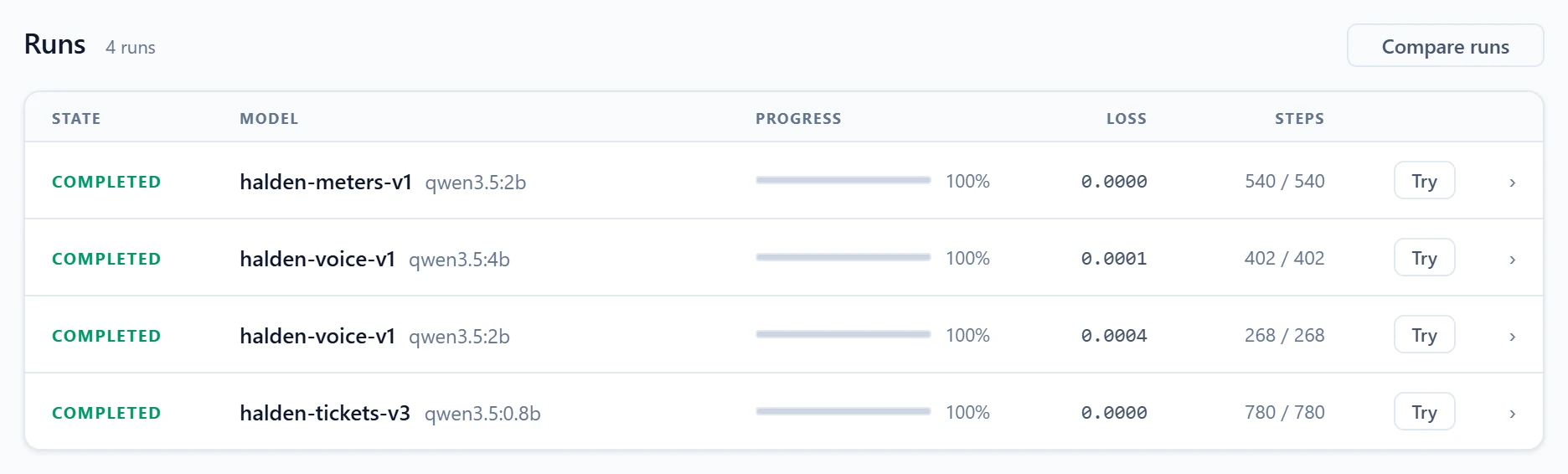
The rest of this guide follows four use cases. The first one goes step by step through every screen; the others focus on what is specific to them.
Use case 1: route support tickets into your own JSON
A fictional software company, Halden, receives support tickets in English, French, German and Spanish. Each one must land with one of seven internal teams, with a priority, as a JSON object the help desk can ingest: finance-ops for billing, sre-oncall for outages, identity for access problems, privacy-office for data requests, and so on. A general model can write JSON. It cannot know that Halden's on-call team is called sre-oncall, or that a payment failing before a suspension is high while a billing question is normal.
Step 1: pick a goal
The first step asks one question: what should the model learn? Each goal card is a recipe, a set of starting values that converge cleanly for that kind of task. Picking one fills in the parameters; every value you later change is marked against it.
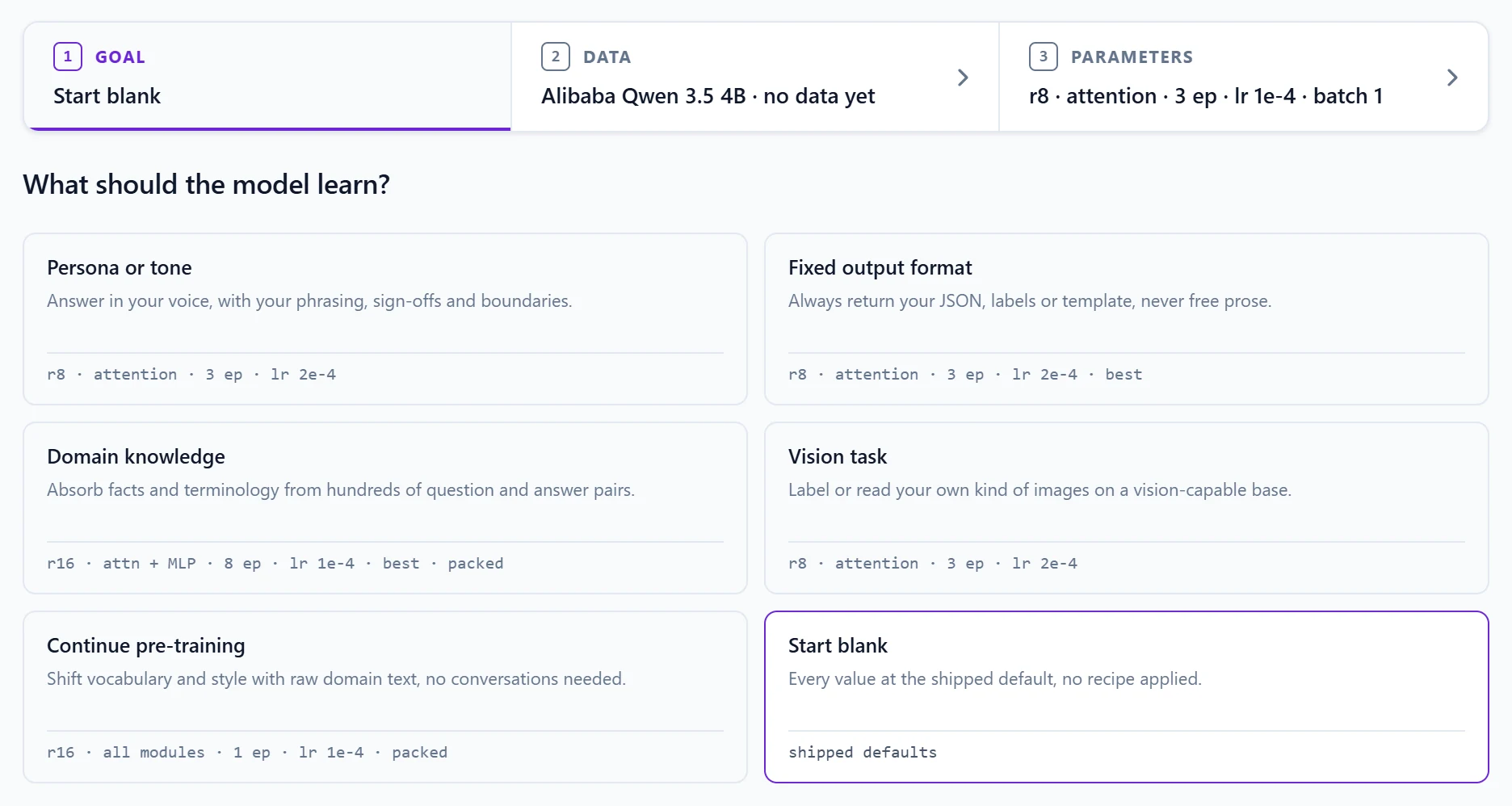
For ticket routing, the goal is Fixed output format: always return your JSON, labels or template, never free prose. Its recipe uses a rank-8 adapter on the attention layers, three epochs, a learning rate of 2e-4, a short warmup, a 10% validation split, and it keeps the weights from the best validation pass rather than the last step.
Step 2: choose the base model and the artifact
The base model list is the LM-Kit model catalog, with a mark on the models already on disk and a fit verdict for your GPU next to the large ones. Start small. Small models train in seconds to minutes and take adaptation well; move up a size only when the small one measurably falls short. Here we pick Qwen 3.5 0.8B, a 605 MB download.
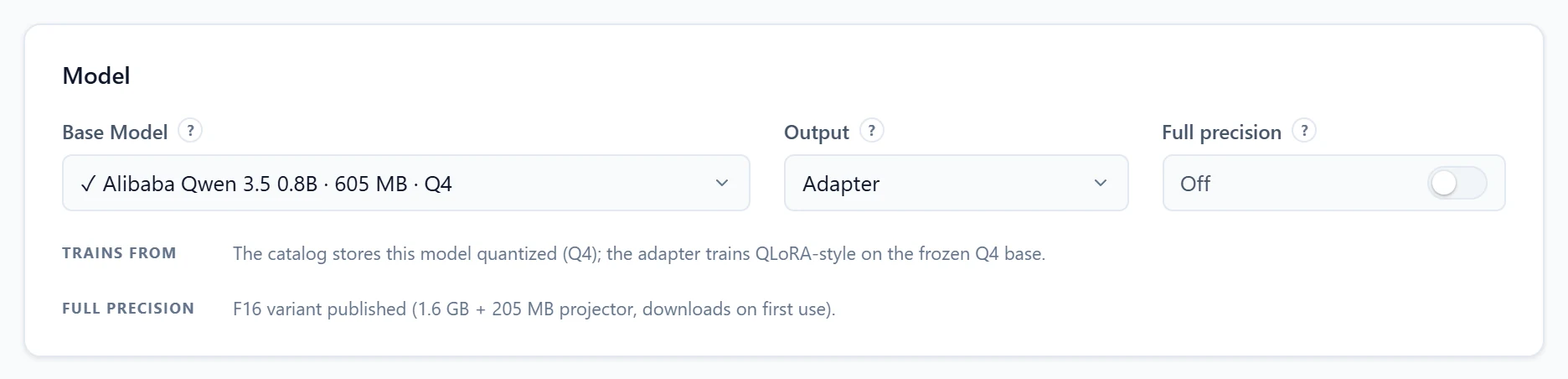
- Output: Adapter or Merged model. An adapter holds only the trained weights, megabytes in size, and is served on top of its base. A merged model folds the adapter into the base as one standalone file. Iterate on adapters; merge a candidate when you want a self-contained deliverable.
- Full precision. Off by default: the adapter trains over the same quantized model you serve, which is what makes training fit on ordinary GPUs. On, the run trains from the model's published F16 or BF16 weights, for the highest-fidelity merge.
- GPUs. On machines with several GPUs, a picker decides where the run trains: where the model already serves, one chosen card, or spread across several.
Step 3: bring your data
The dataset is the specification of the behavior you are training. The model learns exactly what the examples do, inconsistencies included. Our ticket set holds 322 conversations, one per ticket, each with the same system prompt, the ticket as the user turn and the exact JSON as the assistant turn:
{"messages": [
  {"role": "system", "content": "You triage support tickets for Halden. Reply with one JSON object: category, priority, team, language."},
  {"role": "user", "content": "Good morning, sync stopped for the entire organization two hours ago, nothing goes through."},
  {"role": "assistant", "content": "{\"category\": \"outage\", \"priority\": \"urgent\", \"team\": \"sre-oncall\", \"language\": \"en\"}"}
]}
That chat JSONL shape is the same one OpenAI's fine-tuning uses, so existing datasets port unchanged. The workbench also reads ShareGPT and Alpaca JSON, plain text for continued pre-training, and ZIP archives that bundle any of these with images. Upload the file, or paste a few conversations straight into the box for a quick experiment; both combine into one training set.
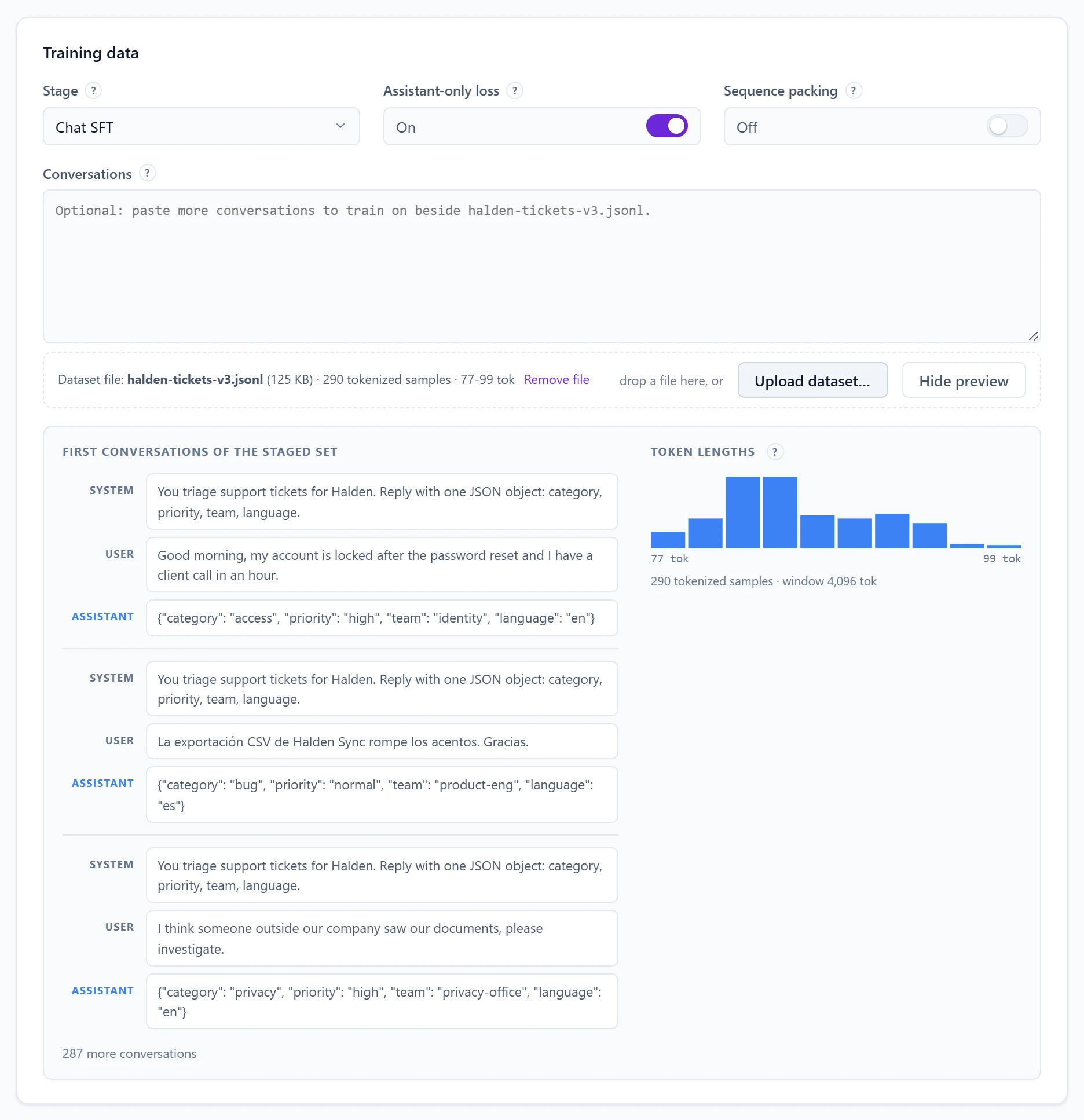
- Stage. Chat SFT trains on conversations. Continue pre-training soaks the model in raw domain text, every token supervised.
- Assistant-only loss. On by default: the model is graded only on the assistant turns. The system prompt and the ticket are context, not targets, which is exactly what instruction tuning needs.
- Sequence packing. Fills each training window with several short samples, fully isolated from each other. Same learning, several times the throughput on short samples.
Step 4: let the health check read your data
Most failed fine-tunes fail in the data. The Health card reads the staged set with the base model's tokenizer and the same loader the run uses, on every change, and names what needs attention. We left two realistic defects in our file on purpose, and it found both.
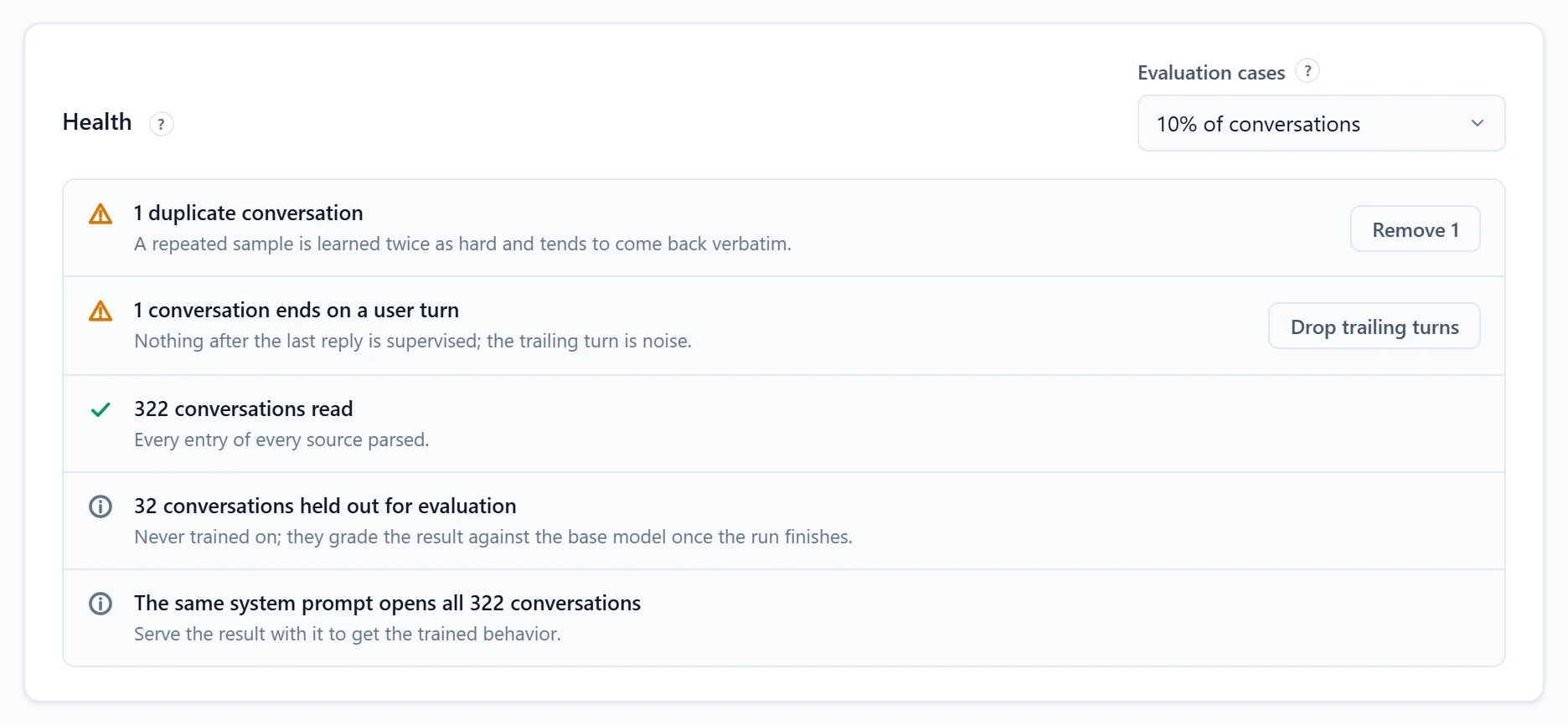
- A duplicate conversation is learned twice as hard and tends to come back verbatim. One click removes it from the run.
- A conversation ending on a user turn carries a trailing message nothing supervises. One click cuts it.
- Evaluation cases. The selector at the top holds a share of conversations out of training for good. Here 10%, 32 tickets, are kept aside to grade the result against its base once the run ends.
- The shared system prompt is detected and remembered: serve the result with it, and you get the trained behavior. Shipping applies it for you.
The check also flags samples longer than the training window (they would be skipped, not truncated), conversations without a reply, and lines it could not parse, each with the count and the reason.
Step 5: review the plan and start
The Parameters step shows the essentials (rank, epochs, learning rate, batch size) and folds everything else into five groups we come back to below. The Plan card prices the run before you commit to it.
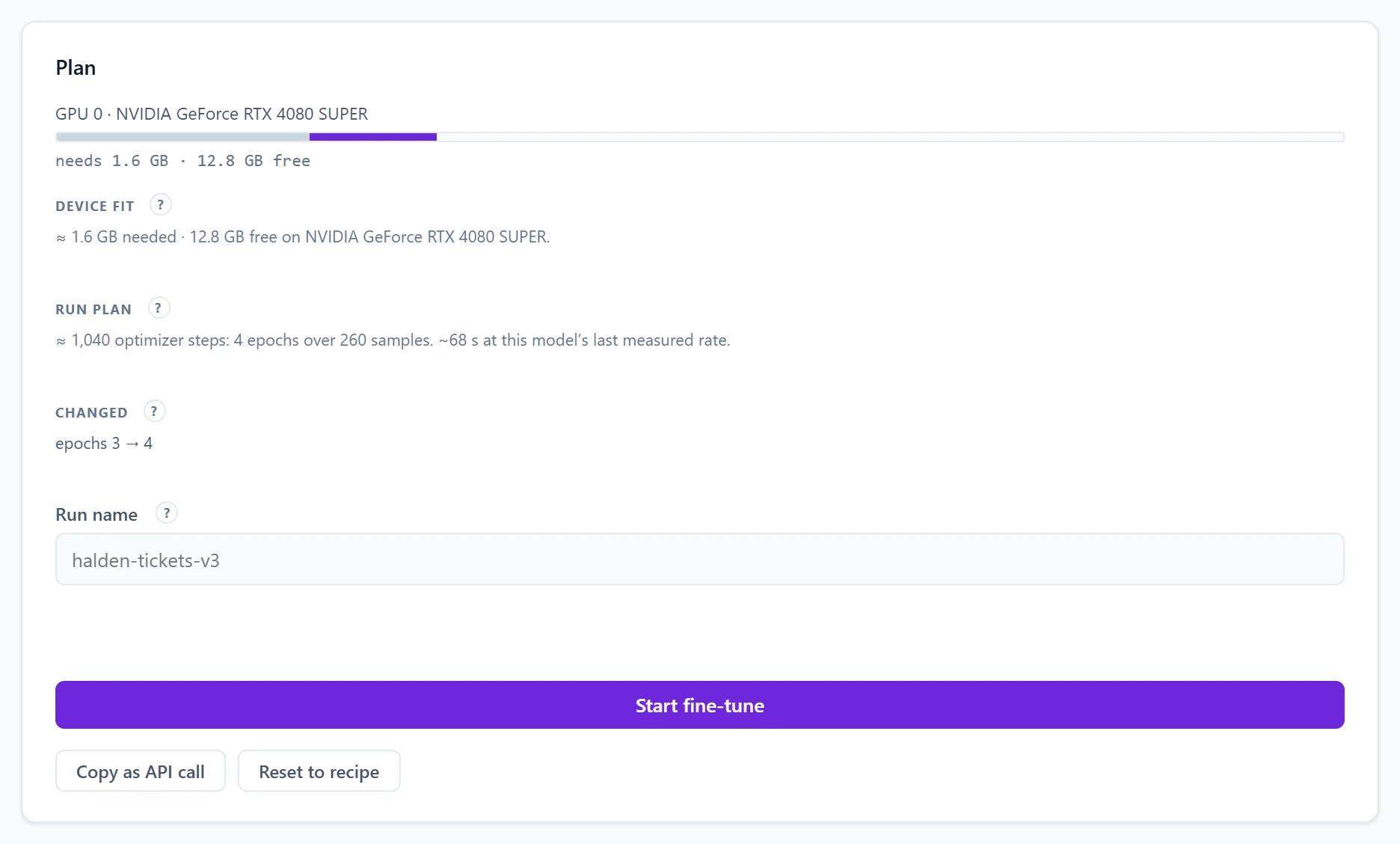
- Device fit estimates the memory for the base weights, the adapter's training state and the compute buffers, against each GPU's free memory, so a run that cannot fit is stopped before a long download.
- Run plan counts the optimizer steps from your data, split and epochs, and projects the wall time from the last completed run on that base.
- Changed lists every value you moved away from the recipe. In the capture above, epochs went from 3 to 4; for our real run we kept the recipe as published.
- Run name is how the run reads in the Runs list. It suggests the dataset file's name; type over it to say what the run tries.
- Copy as API call puts the exact request on the clipboard as a
curlcommand, ready for a script or a pipeline.
Press Start fine-tune (or Ctrl+Enter). The run moves through four phases, Queued, Resolving model, Preparing dataset and Training, and the Overview follows it live.
Step 6: let it learn
On an NVIDIA RTX 4080 SUPER, the 0.8B model trained on the 289 tickets left after the evaluation split and the fixes, for three epochs and 780 optimizer steps, in 51 seconds. Validation loss improved at each of the three passes, so the artifact came from the last one. The adapter written to disk weighs 10 MB. How to read the curves of a run is the subject of its own section below.
Step 7: evaluate against the base model
A finished run opens on four tabs: Run, Evaluate, Ship and Log. Evaluate answers every held-out case twice, once with the base model and once with the result, with the same prompt, greedy decoding and no reasoning, and grades both against the reply each case expects.

The base model's 60% word overlap is the interesting number. It understood the task: it wrote JSON with the right keys and often the right category. What it could not do is follow Halden's rules. Review cases opens each held-out case: the request, then the expected reply, the base model and the result side by side. JSON answers are laid out key by key, and every value that differs from the expected reply is marked.
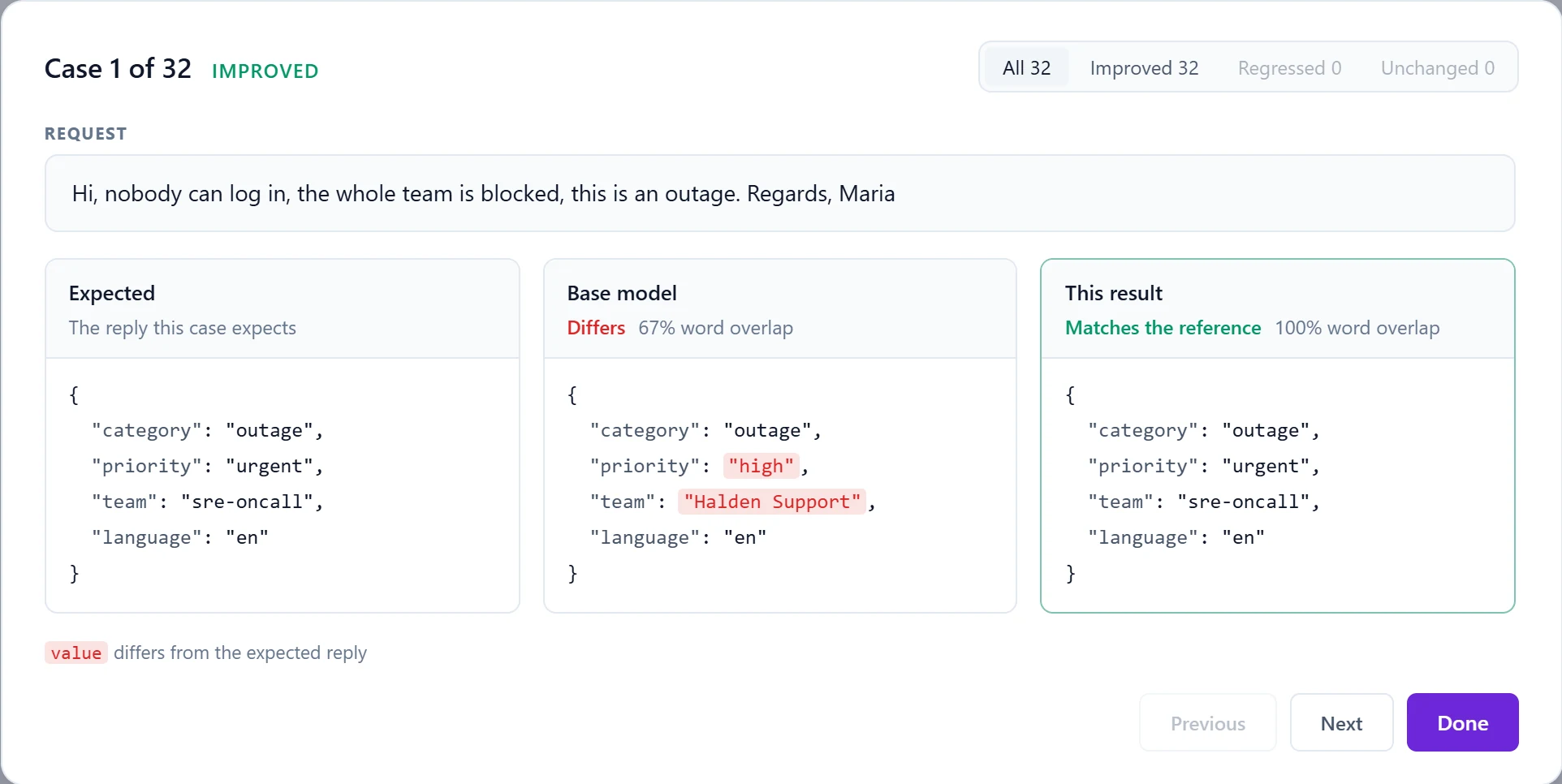
Across the 32 cases the pattern repeats: the base model routes to teams that do not exist ("support", "legal", "Halden"), files a feature request as high priority, and classifies a locked account as "security". The fine-tune learned the taxonomy, the priorities and the team names from examples alone.
Step 8: ship it to every API
The Ship tab registers the result as a model. Give it an id, keep the system prompt the training conversations shared (it is prefilled, and applies whenever a request sends none), and decide whether it reasons by default.

Once registered, halden-triage appears among the server's custom models, served on top of the base it trained from, and it can take a default-model slot so existing clients switch without a configuration change.
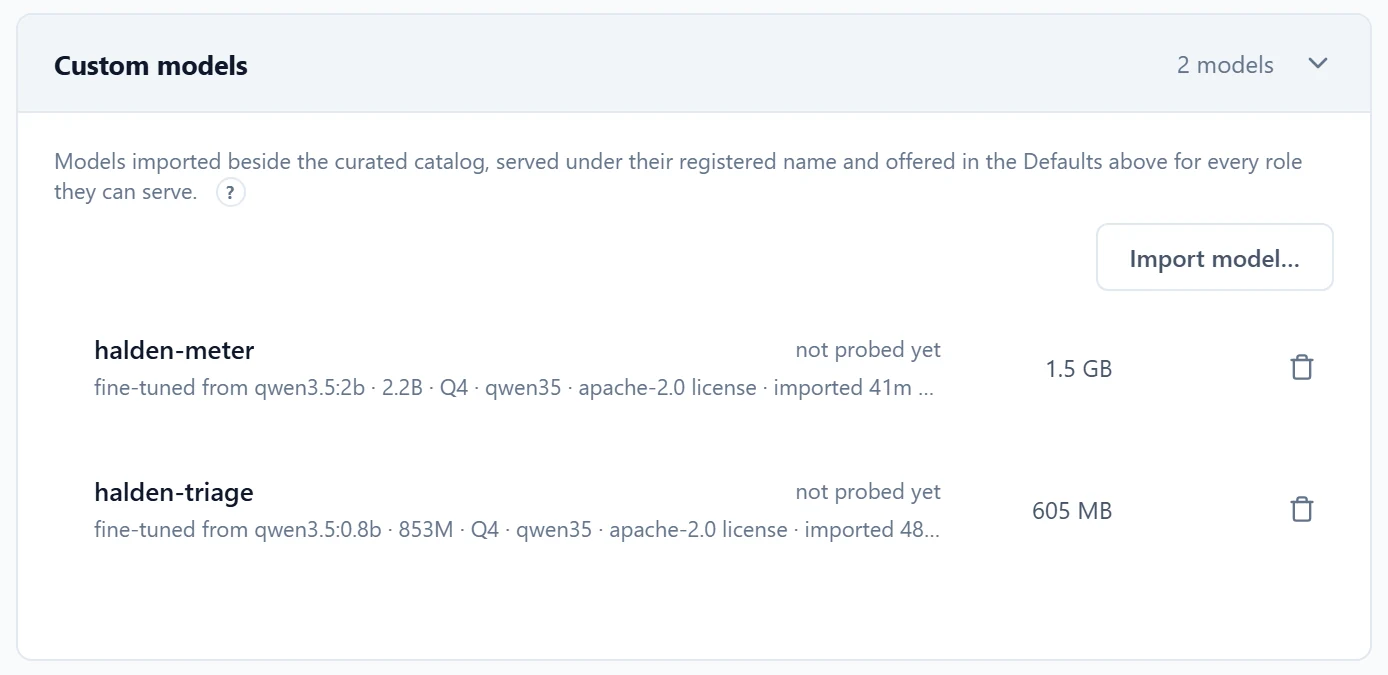
From that moment any client reaches it by its id. Here is the OpenAI-compatible endpoint, called with a French ticket that appears nowhere in the training data, and no system prompt at all:
curl http://localhost:5189/v1/chat/completions \
  -H "Authorization: Bearer $LMKIT_API_KEY" \
  -H "Content-Type: application/json" \
  -d '{"model": "halden-triage", "messages": [{"role": "user",
       "content": "Bonjour, depuis la mise à jour, l’application mobile duplique chaque ligne de paiement que nous importons."}]}'

# choices[0].message.content
{"category": "bug", "priority": "high", "team": "product-eng", "language": "fr"}
A data-corrupting bug in French, routed to product engineering at high priority, in the exact JSON the help desk parses. The same model id works from the Anthropic-compatible endpoint, from Ollama clients, and from the LM-Kit One Playground.
Serve the shape you trained
- The ticket set has one ticket per conversation, so send one ticket per request. A model trained on single exchanges is not trained to route the second ticket of a long chat.
- The system prompt the conversations shared travels with the shipped model. Keep it, or replace it only with the same wording.
Use case 2: answer in your brand's voice
The second use case changes behavior rather than format. Halden wants its support replies to sound like Halden: two or three short sentences, the customer's first name, one concrete next step, never a promised refund or a date, and a "Halden Support" sign-off. Eighty-three example replies covering twelve common requests make the dataset:
{"messages": [
  {"role": "system", "content": "You are Halden Support."},
  {"role": "user", "content": "Can I get a refund for last month?\nRegards,\nInes"},
  {"role": "assistant", "content": "I understand, Ines. Refund decisions sit with our finance team, so I have passed your request to them with your account details. They will reply by email with the outcome.\n\nHalden Support"}
]}
We picked the Persona or tone goal, Qwen 3.5 2B as the base, held out 10% (8 conversations), and raised the epochs to four. The run took 28 seconds.
Grade what matters with your own checks
Exact match is the right grade for a format. For a voice, the rules are what matter, and you can write them as checks. Add check opens a small form: a name, a kind (contains, does not contain, matches a regular expression, equals) and a value. Every answer, from the base and from the result, is graded against each check.
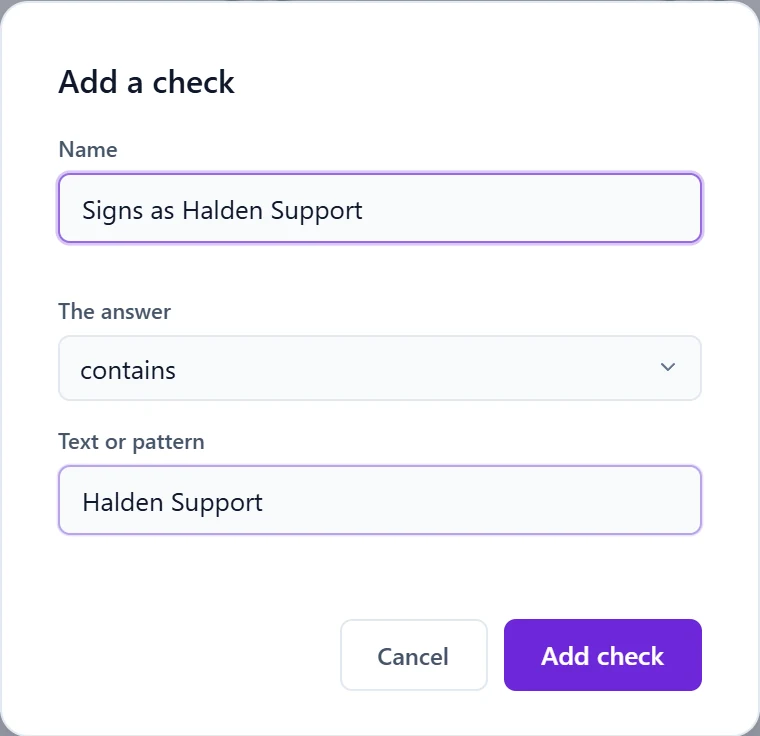
We added three: the reply signs as Halden Support; it stays within three sentences before the sign-off; it never contains "will be refunded".
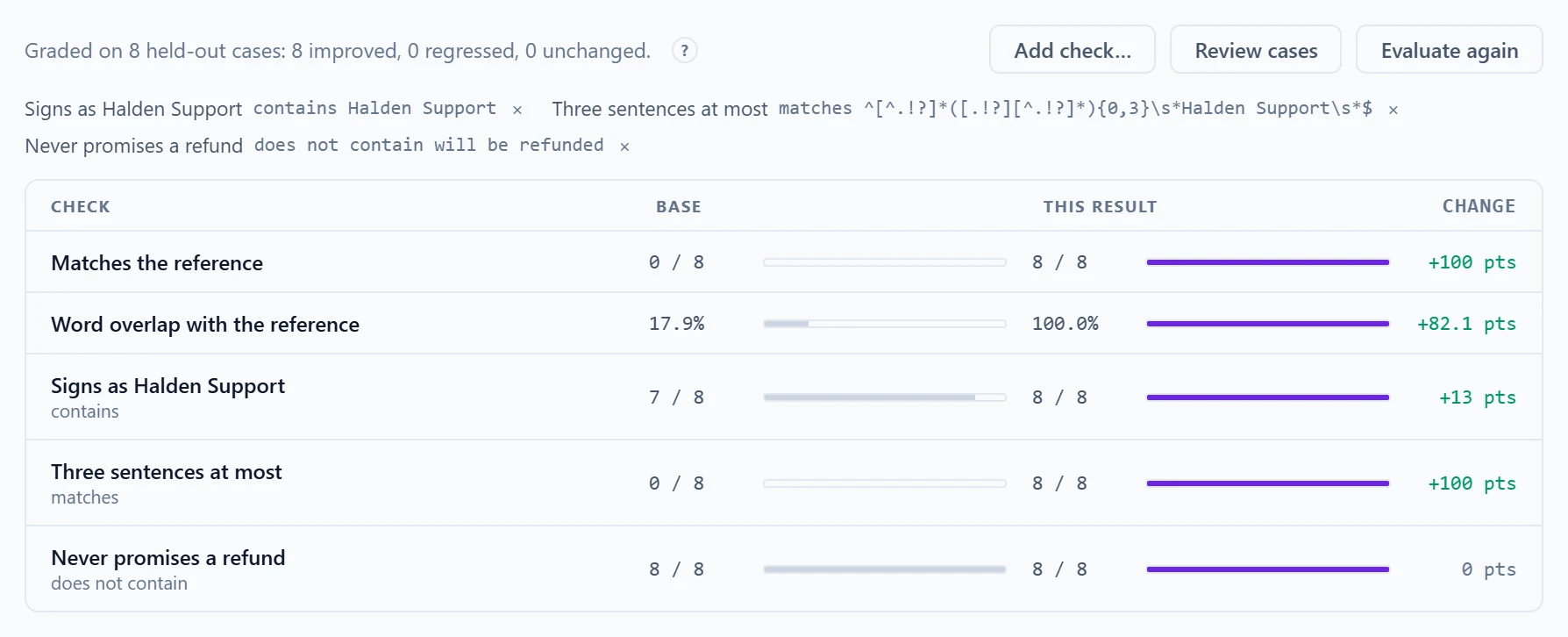
Custom checks tell you which behavior moved, and which was already fine, which is what you need to decide whether a run is worth shipping. Here, the length rule moved from 0 of 8 to 8 of 8. Reading a case shows why the base fails it:
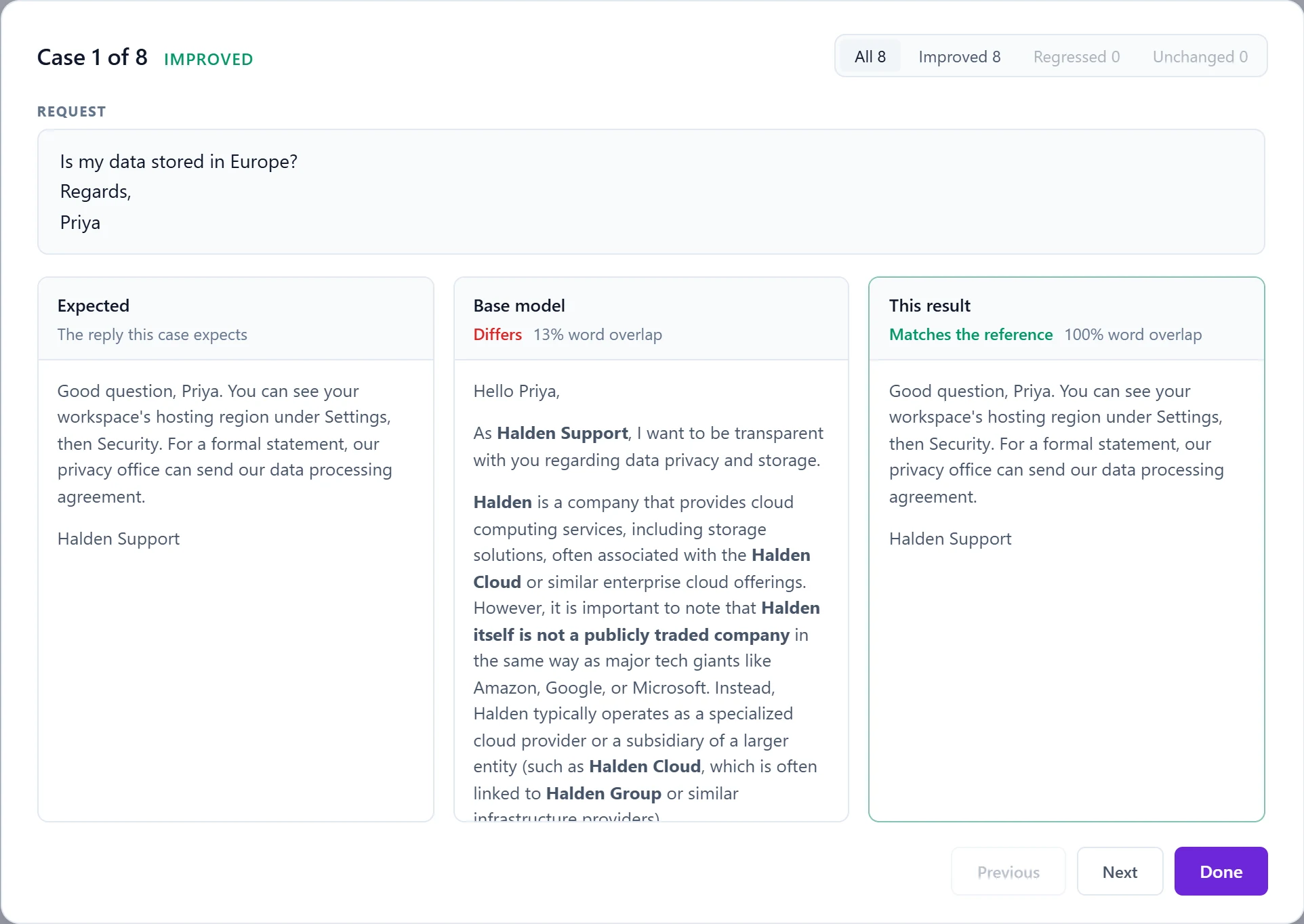
The base model's answer is the risk every company fears from generic AI in front of customers: fluent, confident and made up. The fine-tuned reply is short, accurate to the behavior it was taught, and sends the customer somewhere real. That is the difference between a demo and something you can put in front of customers.
Use case 3: read your own kind of images
Fine-tuning is not only for text. A vision-capable base can learn to read, label or describe your kind of images: meter displays, instrument panels, a document layout you process every day, product photos. Our example teaches a model to read utility meters from photos and answer with the reading and its unit, nothing else.
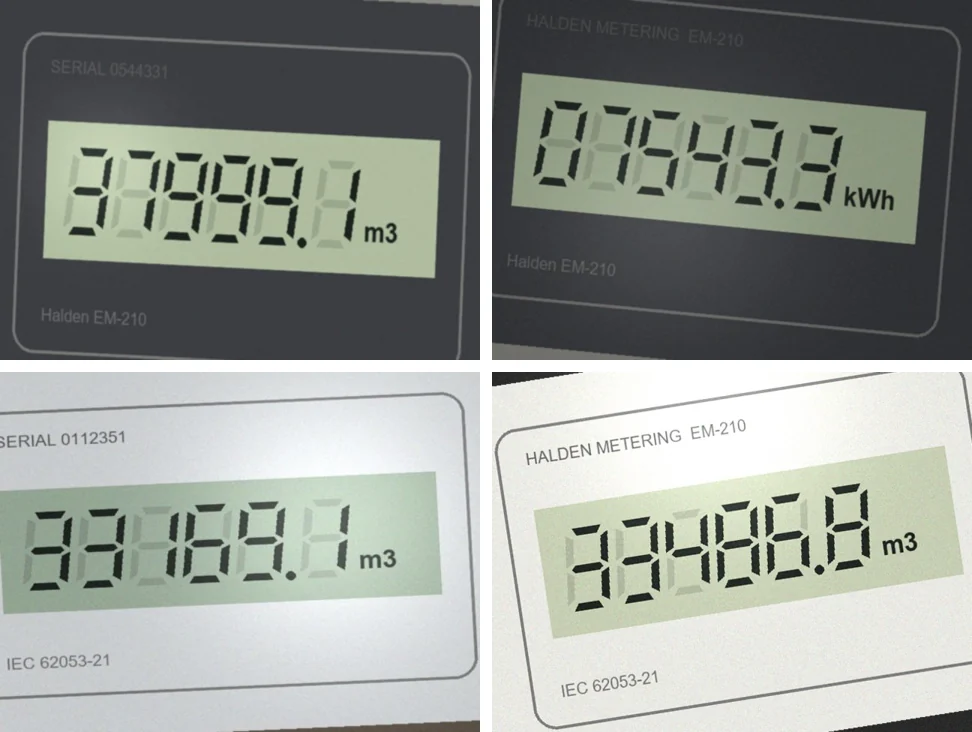
The dataset is the same chat JSONL, with an images list on the user message and an <image> marker where the image belongs. Ship the file and its images as one ZIP and the relative paths resolve inside the archive:
{"messages": [
  {"role": "user", "content": "What does this meter read? <image>", "images": ["meters/m001.jpg"]},
  {"role": "assistant", "content": "07543.3 kWh"}
]}
Three things are worth knowing about vision runs:
- The eye stays frozen. The vision encoder does not train; images pass through it exactly as at inference, and the adapter trains the language side to interpret what it sees. Fine-tuning sharpens interpretation, never perception. For images unlike anything the base has seen, the projector between the two can train too.
- Keep images honest. Train on photos that look like production: the same cameras, angles and lighting, at their natural resolution. Upscaled or cleaned-up images teach a model that stumbles on real ones.
- Narrow beats broad. Forty to sixty well-labeled images can visibly move one specific behavior. General visual competence is not what a fine-tune buys; reliability on your task is.
With the Vision task goal on Qwen 3.5 2B, five epochs over 120 photos took 1 minute 46 seconds and wrote a 14 MB adapter. Then we photographed 20 new meters, never seen in training, and asked the base and the fine-tune the same question through the API.
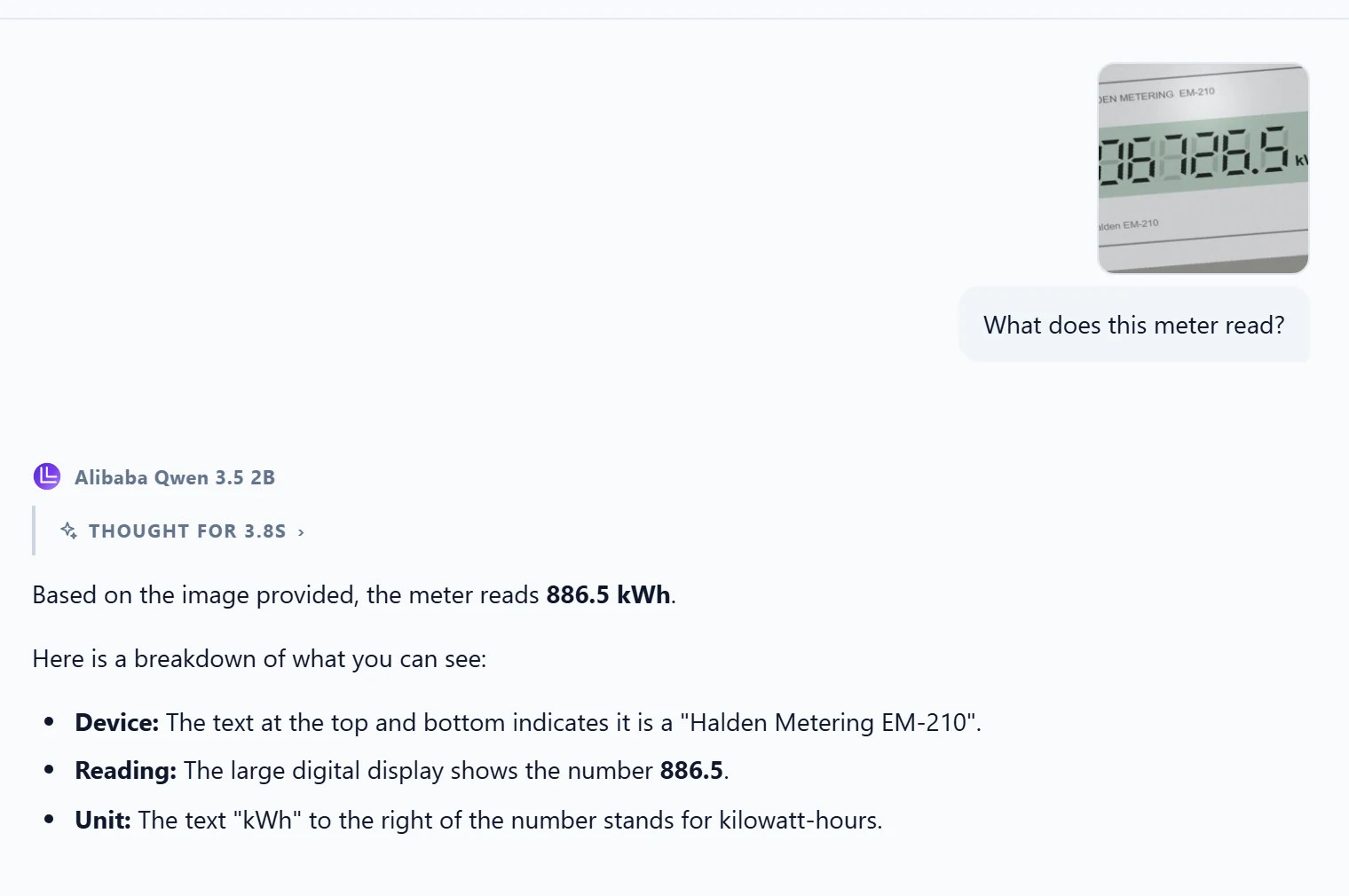
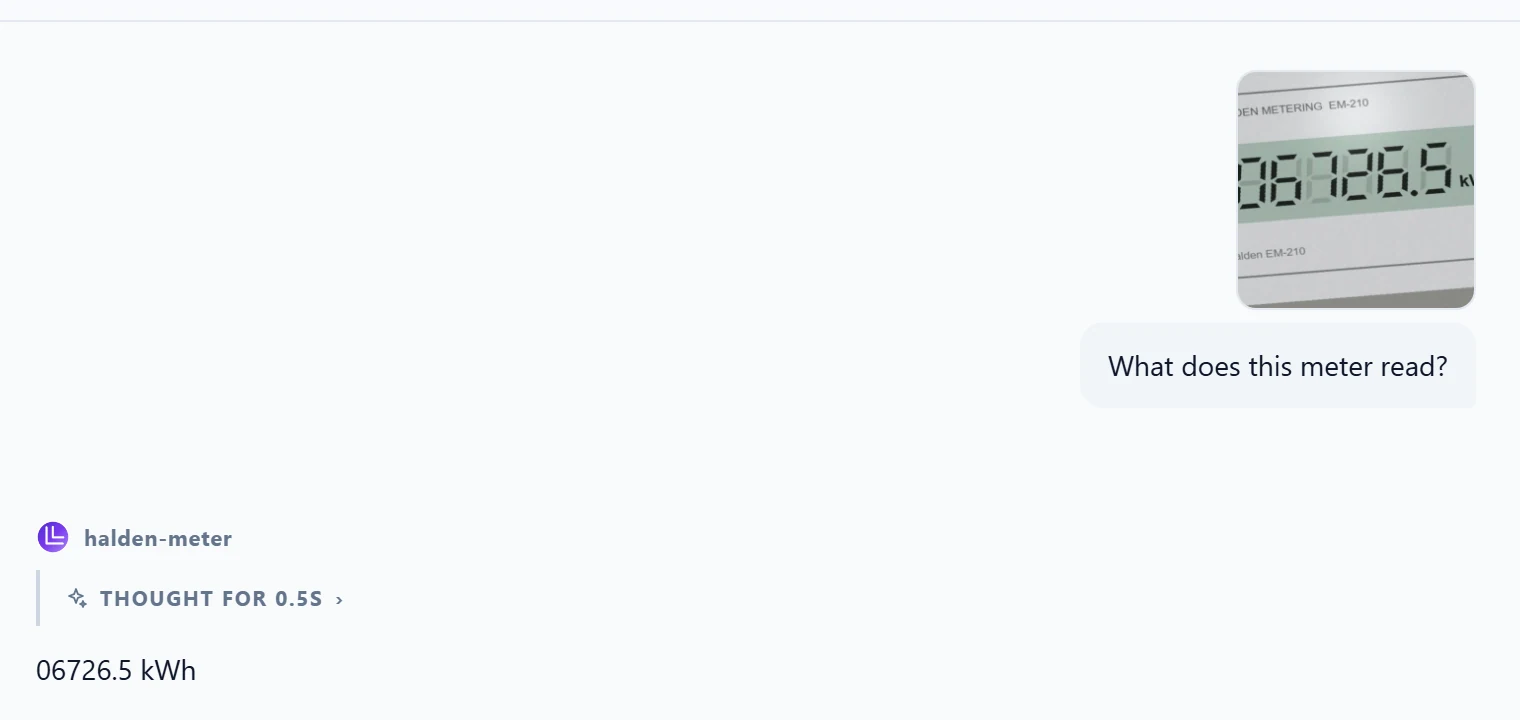
The fine-tune improved both what the model reads and how it answers. The two photos it missed dropped one digit of five; a larger set of hard cases, more varied angles, or a larger base are the next levers. The built-in Evaluate tab grades text conversations, so for image cases we graded through the API with a twenty-line script, shown in the automation section below.
More use cases, same workbench
The three runs above cover the most common requests we hear. The same loop serves many others; the goal cards give the right starting point for each.
| Use case | What the examples show | Goal to start from |
|---|---|---|
| Classification with your categories | Text in, one of your labels out | Fixed output format |
| Extraction to your schema | A document or email in, your JSON fields out | Fixed output format |
| Compliance-safe customer replies | Your phrasing, disclaimers and refusals, including when to decline | Persona or tone |
| Domain terminology and short factual answers | Hundreds of question and answer pairs from your field | Domain knowledge |
| Internal style for reports or code | Inputs paired with outputs written your way | Persona or tone |
| Reading forms, displays or labels | Your images paired with the exact reading | Vision task |
| Vocabulary of a specialized field | Raw text: manuals, reports, internal wikis | Continue pre-training |
When the behavior also depends on facts that change, pair the fine-tune with retrieval: LM-Kit One's search and grounded answers keep the facts current, the fine-tune keeps the behavior consistent.
Reading a run: curves, diagnoses, comparisons
While a run trains, its detail panel shows the training loss, the validation loss after each epoch, progress, an ETA, accuracy, the learning rate and the elapsed time, with live resources underneath: GPU load, VRAM, host memory, step time and throughput.
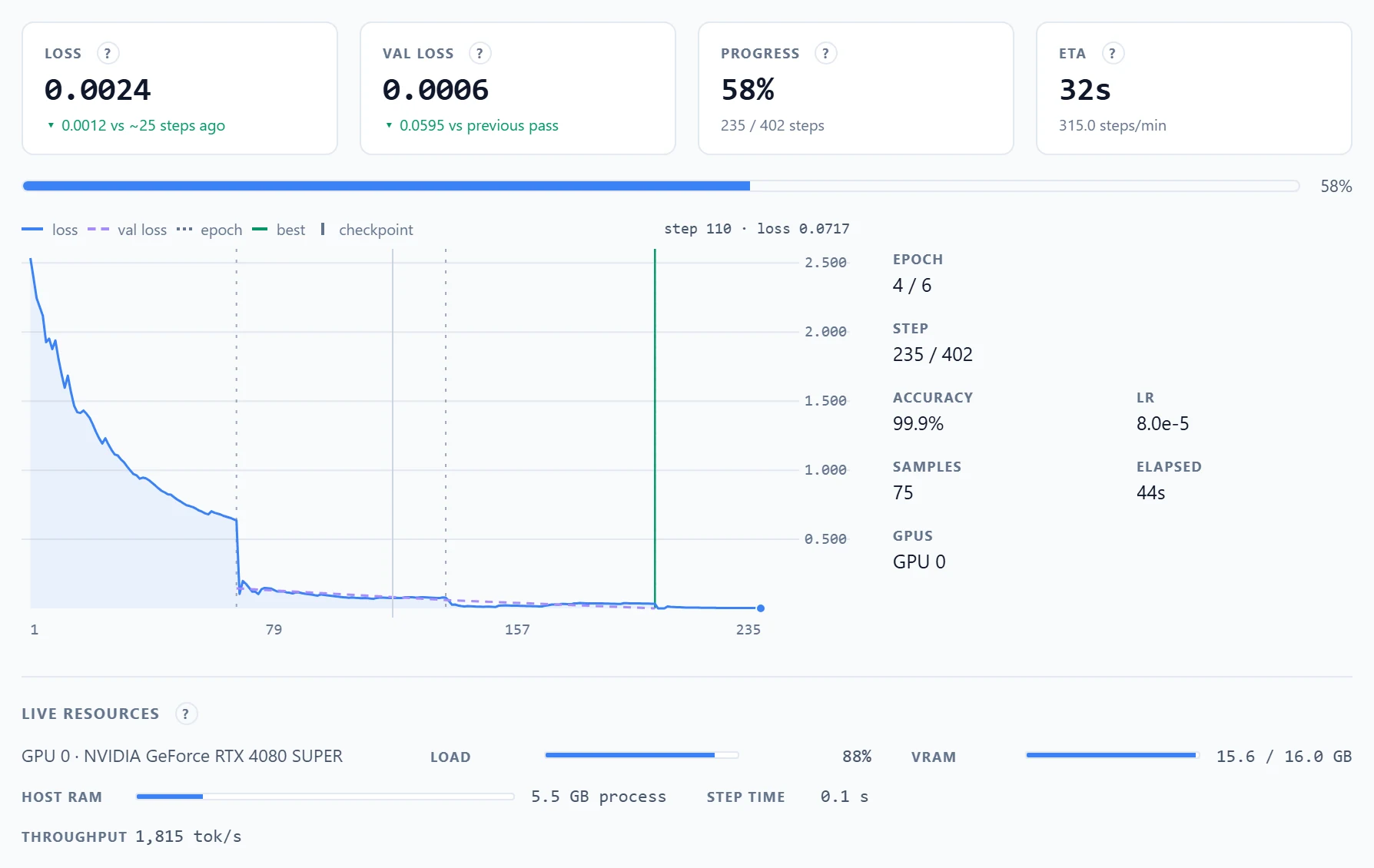
Two curves tell the whole story. Training loss says the optimizer is working. Validation loss, measured on samples the run never trains on, says whether what it learns generalizes. Read them together:
| What you see | What it means | What to do |
|---|---|---|
| Both fall, validation slightly above training | Healthy learning that generalizes | Let it finish |
| A steep drop, then a long flat line | Normal convergence | Stop adding epochs once validation stops improving |
| Training falls, validation rises | Memorizing instead of generalizing | Fewer epochs, more varied data, or NEFTune |
| Both stay flat and high | Not learning | Check the data's roles, raise the learning rate, add capacity |
| Loss jumps or spikes upward | Steps too aggressive | Lower the learning rate, add warmup |
You do not have to remember the table: when a finished run shows one of these patterns, the workbench says so in plain words. Our vision run memorized after its second epoch, and the panel named it:
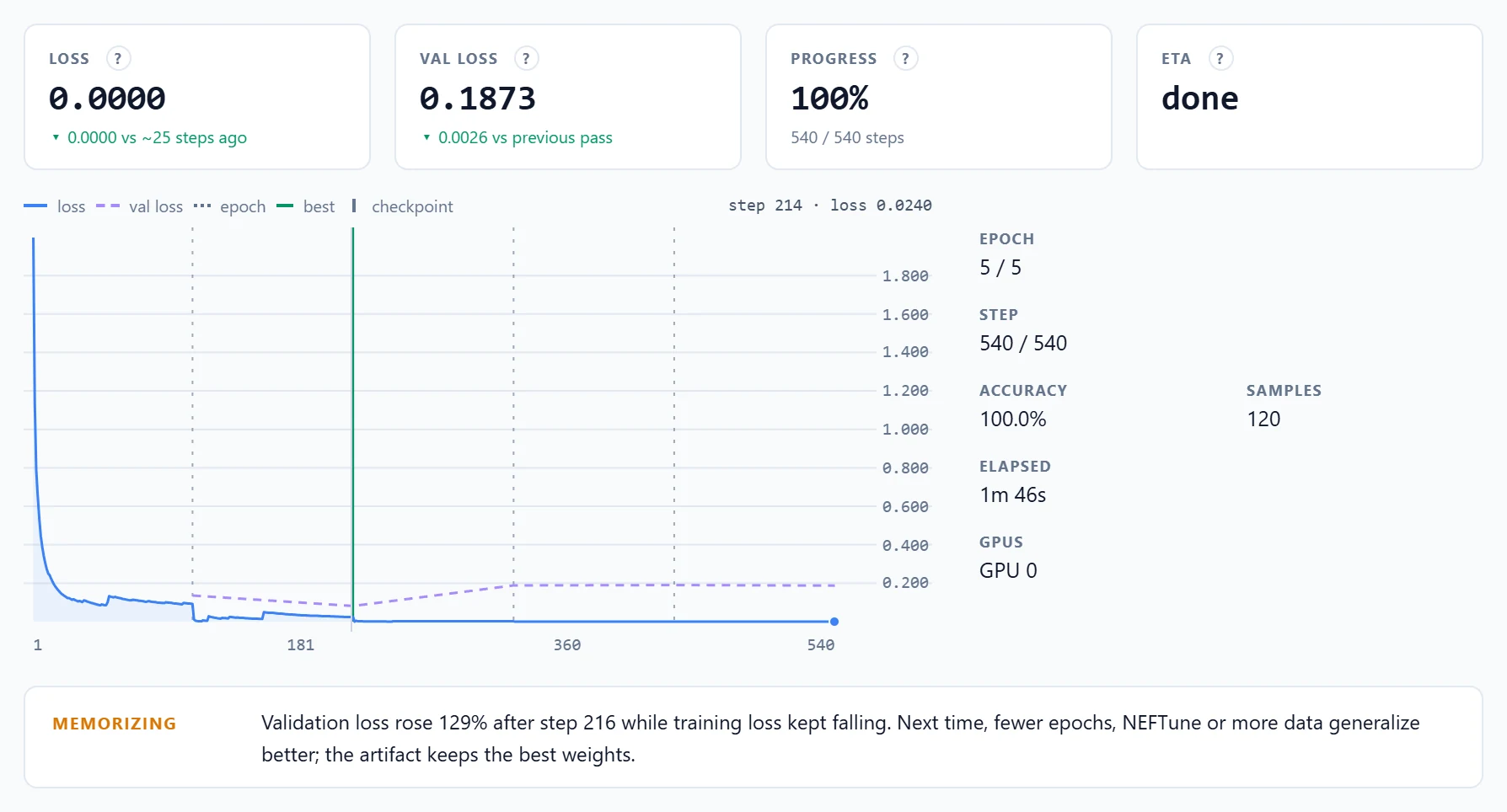
This is why the recipes keep the artifact from the best validation pass: the run snapshots the adapter whenever validation improves, so even a run that overfits at the end delivers its best self. That is the adapter that read 18 of 20 new meter photos. Three more controls handle long runs:
- Early stopping. Stop after a set number of validation passes without improvement. Patience 2 with a validation split is a safe default for long runs.
- Checkpoints and resume. Save the adapter and optimizer state every N steps; resume a finished run from any checkpoint with its moments and step counter restored.
- Stop is safe. Stopping halts after the current batch and keeps what was trained. Runs are journaled on disk and survive a server restart, with any partial artifact still downloadable.
To choose between two configurations, Compare runs overlays the loss curves of any two runs. Here, the same brand-voice data on a 4B base with LoRA+ against the 2B base: the 4B starts lower and drops faster, then both converge.
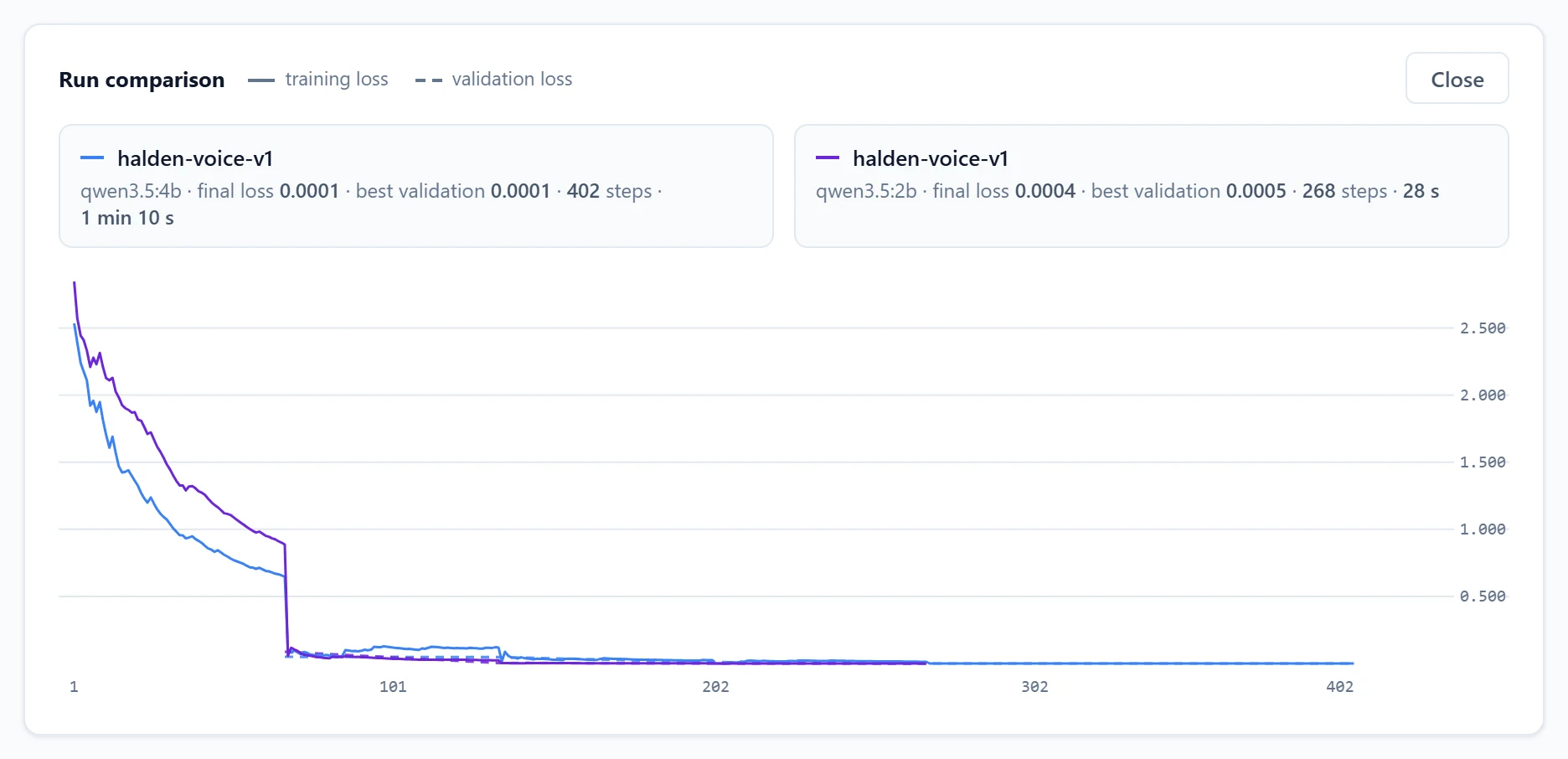
The 2B reached the same final loss as the 4B in less than half the time (28 seconds against 70), with an adapter half the size (14 MB against 28 MB), and it is cheaper to serve. When the evaluation agrees, comparisons like this one are how you pick the smallest model that does the job.
The parameters, explained without the jargon
Every parameter maps to one of three levers: capacity, how much the adapter can absorb; exposure, how hard the data pushes; and stability, what keeps that push controlled. The workbench groups them that way, and each field carries a help mark that explains it.
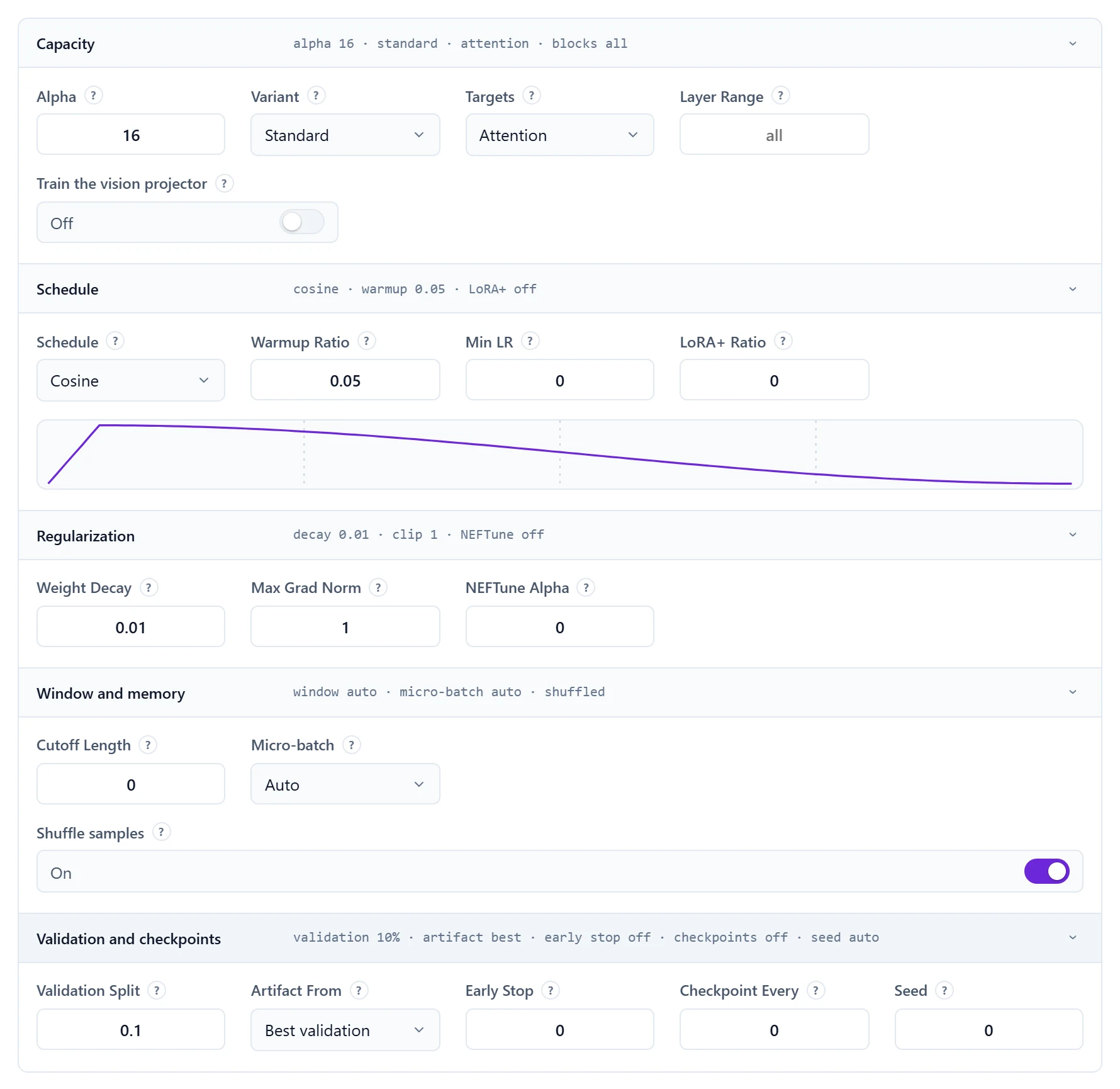
- Rank and alpha (capacity). Rank is the adapter's size and learning capacity: 4 to 8 for style and format, 16 to 32 to absorb new associations. Keep alpha at twice the rank; from rank 32, the rank-stabilized variant keeps high ranks effective.
- Targets and layers (capacity). Attention layers by default; add the feed-forward layers for tasks that must absorb content; restrict to the last third of the layers when memory is tight.
- Epochs and learning rate (exposure). Three epochs suit hundreds of samples; tiny curated sets want five to eight with a validation split watching. 2e-4 is a solid small-run baseline.
- Schedule and warmup (exposure). Cosine decay is the safe default. A short warmup keeps the first steps from lurching.
- Regularization (stability). Weight decay and gradient clipping rarely need touching. NEFTune counters memorization on small instruction sets; LoRA+ speeds convergence at no memory cost.
- Window and micro-batch (memory). The window sizes itself to your longest sample. Micro-batch trades speed for memory without changing what is learned.
The rule that saves the most time: change one lever at a time from a recipe, and let the curves decide. The defaults are a real baseline, not a placeholder.
Let the assistant set it up
Not sure which goal, base or values fit your task? The Assistant button opens a panel that answers on the server's default chat model, from what the page shows. Describe what the model should learn, or open a run and ask about its curves or its evaluation.
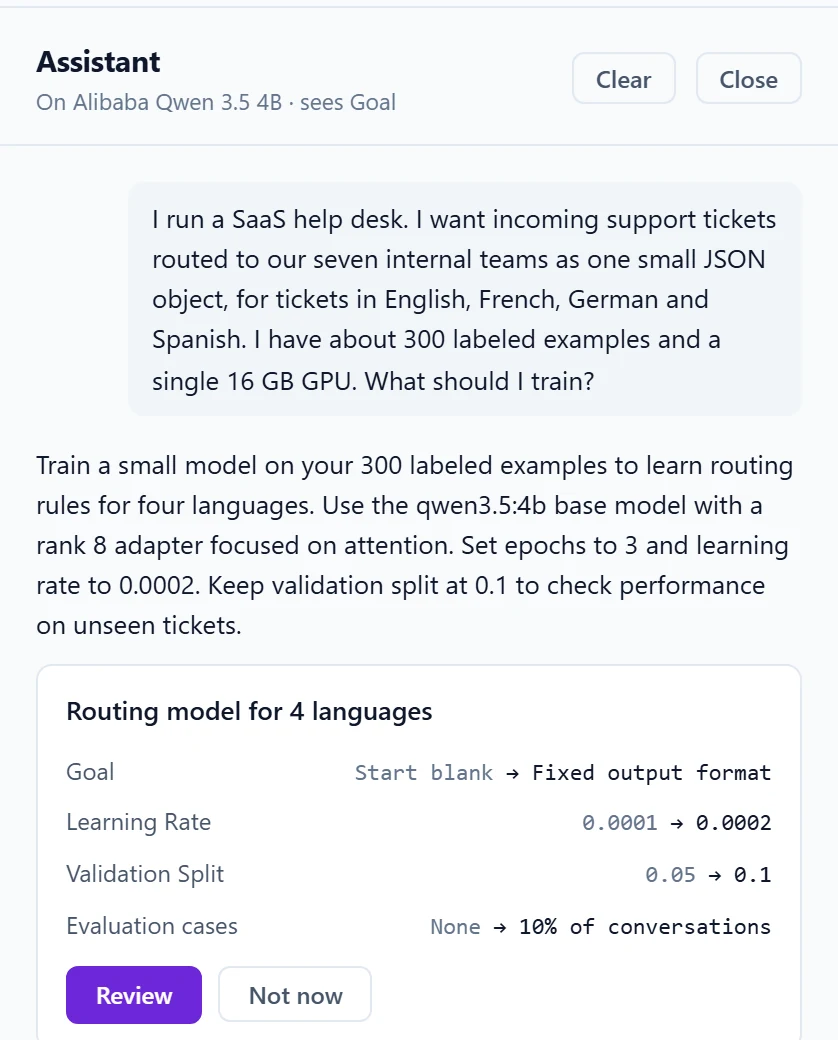
Proposals are shown as a list of changes, from the current value to the proposed one. Nothing changes until you press Review, and Review never starts a run. The assistant runs locally too: on the same server, on its own model, with no call to an outside service.
Hardware, memory and speed
Training runs on the same machine that serves inference, GPU-accelerated wherever a GPU exists. Because LoRA freezes the base model, the memory story is far kinder than full fine-tuning:
- The base weights take exactly what they take to serve, and training adds nothing to them.
- Activations are the big adjustable cost, and the micro-batch controls them linearly. A run that leaves micro-batch on Auto halves it by itself until the run fits.
- The adapter and its optimizer state stay small next to the base.
When a run does not fit, walk down a short ladder: lower the micro-batch, restrict the layers to the last third, narrow the targets back to attention, lower the rank, and only then shorten the window. On a machine with several GPUs, spreading a run across them adds room at no cost in quality, and pinning a run to a card the serving traffic does not use keeps inference latency untouched while it trains.
Every run in this guide trained on one NVIDIA RTX 4080 SUPER, a 16 GB desktop card, inside the same LM-Kit One server that answered the API calls and the Playground:
| Run | Base | Training data | Steps | Wall time | Adapter |
|---|---|---|---|---|---|
| Ticket routing | Qwen 3.5 0.8B | 289 conversations | 780 | 51 s | 10 MB |
| Brand voice | Qwen 3.5 2B | 75 conversations | 268 | 28 s | 14 MB |
| Brand voice, LoRA+ | Qwen 3.5 4B | 75 conversations | 402 | 70 s | 28 MB |
| Meter reading | Qwen 3.5 2B, vision | 120 photos | 540 | 1 min 46 s | 14 MB |
The datasets were built for this guide and the conversations are short, so treat those times as an illustration of scale rather than a promise: longer samples, larger bases and image runs, which never pack, take longer. Every completed run ends with a measured report of its own (device, steps, wall time, seconds per step, losses and peak compute memory), which is the ground truth for planning the next one.
Automate it: the same engine over REST
Everything the workbench does is an API call, so fine-tuning fits into a CI pipeline, a nightly job or your own product. Upload the dataset, start a run, follow it, grade the result and ship it:
Upload the dataset once, then start a run with the Fixed output format recipe written out as request fields.
curl -X POST http://localhost:5189/lmkit/v1/files/upload \
  -H "Authorization: Bearer $LMKIT_API_KEY" \
  -F "file=@halden-tickets.jsonl"
# {"file_id": "..."}

curl -X POST http://localhost:5189/lmkit/v1/training/jobs \
  -H "Authorization: Bearer $LMKIT_API_KEY" \
  -H "Content-Type: application/json" \
  -d '{
    "model": "qwen3.5:0.8b",
    "name": "halden-tickets-v3",
    "dataset_file_id": "<file_id>",
    "rank": 8, "alpha": 16, "target_modules": "attention",
    "epochs": 3, "learning_rate": 0.0002, "warmup_ratio": 0.05,
    "validation_split": 0.1, "evaluation_split": 0.1,
    "artifact_from_best": true,
    "remove_duplicates": true, "drop_trailing_user_turns": true,
    "output": "adapter"
  }'
# {"job_id": "train-...", "status": "Queued", ...}
Poll the job until it completes, grade it against its base on the held-out cases, then register it as a model.
# status, phase, step, loss and validation loss, live
curl http://localhost:5189/lmkit/v1/training/jobs/$JOB \
  -H "Authorization: Bearer $LMKIT_API_KEY"

# base and result answer the held-out cases, with your checks
curl -X POST http://localhost:5189/lmkit/v1/admin/training/jobs/$JOB/evaluation \
  -H "Authorization: Bearer $LMKIT_ADMIN_KEY" \
  -H "Content-Type: application/json" \
  -d '{"checks": [{"name": "Valid team", "kind": "regex",
        "value": "\"team\": \"(finance-ops|sre-oncall|product-eng|identity|privacy-office|product-mgmt|revenue)\""}]}'

# serve it under a model id on every API
curl -X POST http://localhost:5189/lmkit/v1/admin/training/jobs/$JOB/register \
  -H "Authorization: Bearer $LMKIT_ADMIN_KEY" \
  -H "Content-Type: application/json" \
  -d '{"name": "halden-triage", "reasoning": false}'

# or take the GGUF anywhere
curl -o halden-triage.adapter.gguf \
  http://localhost:5189/lmkit/v1/training/jobs/$JOB/artifact \
  -H "Authorization: Bearer $LMKIT_API_KEY"
Grade a vision fine-tune on new photos through the OpenAI-compatible API, exact match against the expected reading.
import base64, json
from openai import OpenAI

client = OpenAI(base_url="http://localhost:5189/v1", api_key="<your key>")

def read(model, path):
    image = base64.b64encode(open(path, "rb").read()).decode()
    reply = client.chat.completions.create(
        model=model, temperature=0, reasoning_effort="none",
        messages=[{"role": "user", "content": [
            {"type": "text", "text": "What does this meter read?"},
            {"type": "image_url",
             "image_url": {"url": "data:image/jpeg;base64," + image}}]}])
    return reply.choices[0].message.content.strip()

cases = [json.loads(line) for line in open("holdout/meters.jsonl")]
for model in ("qwen3.5:2b", "halden-meter"):
    exact = sum(read(model, "holdout/" + c["messages"][0]["images"][0])
                == c["messages"][1]["content"] for c in cases)
    print(model, exact, "/", len(cases))
The workbench's Copy as API call gives you the starting request for any run you configured by hand. Every finished job also keeps its full request beside its artifact: with the dataset under version control, any model can be rebuilt and explained months later.
Questions teams ask
Does our data leave the machine?
No. The dataset, the training, the evaluation and the artifact stay on the server that runs LM-Kit One. Base models download once from the catalog, or are imported for fully air-gapped installations.
How much data do we need?
Fewer examples than most teams expect, if they are consistent. A few hundred sharp examples beat thousands of noisy ones: the ticket router learned from 289, the brand voice from 75. Include the boundaries, the refusals and the edge cases, or the model will never learn them.
Will the model lose its general skills?
An adapter changes behavior on the task it was trained for. Aggressive runs on small datasets can trade some general behavior for the task, which is why the evaluation discipline matters: grade the cases you care about, try a handful of general prompts in the Playground, and keep the artifact from the best validation pass.
Which models can we fine-tune?
Base models from the LM-Kit catalog, including vision-capable ones, and your own GGUF files by path. The base model's license applies to the result, and the Console shows it next to every custom model.
Can we use the result outside LM-Kit One?
Yes. The artifact is a standard GGUF: an adapter that applies over its exact base, or a merged model that loads alone, optionally quantized in the same step. LM-Kit.NET loads either directly in your own .NET applications.
Do we need a data science team?
No. The goals, the health check, the plan, the diagnoses and the evaluation turn the expert knowledge into defaults and plain-language guidance. What you need is someone who knows what good output looks like for your business, because that person writes the examples.
Start with one behavior
The fastest way to see what fine-tuning can do for your organization is to pick one behavior that matters, a classification, a format, a voice, a document you read every day, and write down a few hundred examples of it done right. LM-Kit One turns them into a model your applications can call, proves it against the base, and keeps everything on your own hardware.
The complete reference, from dataset preparation to deployment, is in the fine-tuning guides of the LM-Kit One documentation. If you build in .NET, the same engine is available in LM-Kit.NET: see LLM fine-tuning.
Fine-tune on your own hardware
Both products are free to build and evaluate. No activation, no time limit.
Have a behavior you want a model to learn? Tell us about it: what goes in, what should come out, and what good looks like.