
Chunk
Chunks that follow the document
Split on headings, keep a table or a chart whole: no chunk starts mid-table or mid-sentence.
Cloud-class document understanding without sending a page to a cloud parser: tables kept whole, charts read as data, every element grounded to its page.
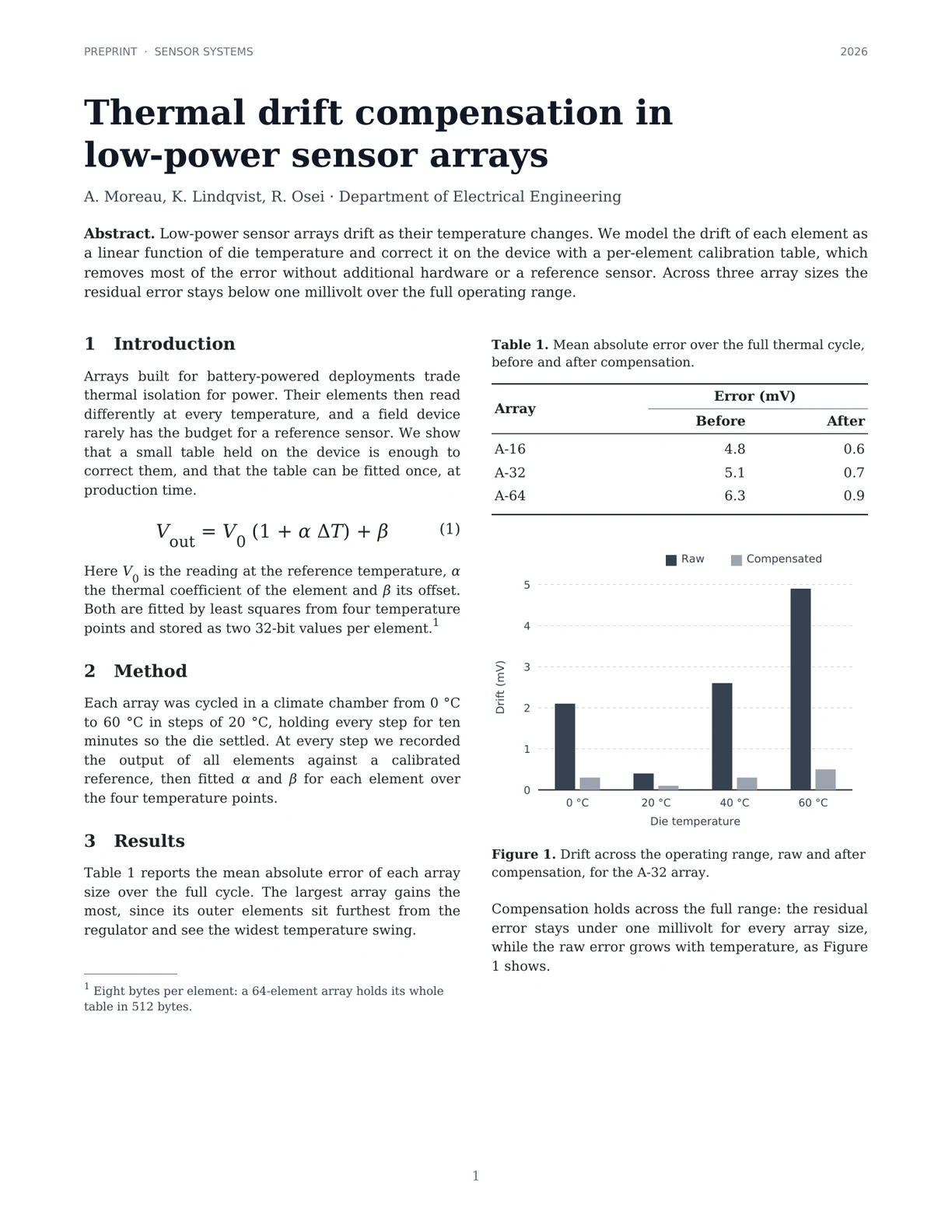
| Die temperature | Raw | Compensated |
|---|---|---|
| 0 °C | 2.1 | 0.3 |
| 20 °C | 0.4 | 0.1 |
| 40 °C | 2.6 | 0.3 |
| 60 °C | 4.9 | 0.5 |
PREPRINT · SENSOR SYSTEMS
2026
Thermal drift compensation in low-power sensor arrays
A. Moreau, K. Lindqvist, R. Osei · Department of Electrical Engineering
Abstract. Low-power sensor arrays drift as their temperature changes. We model the drift of each element as a linear function of die temperature and correct it on the…
1 Introduction
Arrays built for battery-powered deployments trade thermal isolation for power. Their elements then read differently at every temperature, and a field device rarely has…
V_{\text{out}} = V_0 (1 + \alpha \Delta T) + \beta \quad (1)Here V0 is the reading at the reference temperature, α the thermal coefficient of the element and β its offset. Both are fitted by least squares from four temperature…
2 Method
Each array was cycled in a climate chamber from 0 °C to 60 °C in steps of 20 °C, holding every step for ten minutes so the die settled. At every step we recorded the…
3 Results
Table 1 reports the mean absolute error of each array size over the full cycle. The largest array gains the most, since its outer elements sit furthest from the…
Table 1. Mean absolute error over the full thermal cycle, before and after compensation.
| Array | Error (mV) | |
|---|---|---|
| Before | After | |
| A-16 | 4.8 | 0.6 |
| A-32 | 5.1 | 0.7 |
| A-64 | 6.3 | 0.9 |
| Die temperature | Raw | Compensated |
|---|---|---|
| 0 °C | 2.1 | 0.3 |
| 20 °C | 0.4 | 0.1 |
| 40 °C | 2.6 | 0.3 |
| 60 °C | 4.9 | 0.5 |
Figure 1. Drift across the operating range, raw and after compensation, for the A-32 array.
Compensation holds across the full range: the residual error stays under one millivolt for every array size, while the raw error grows with temperature, as Figure 1…
1 Eight bytes per element: a 64-element array holds its whole table in 512 bytes.
1
ParseBench grades what AI agents need from a page. LM-Kit ranks first overall, ahead of every cloud service and frontier model on the board, and first of everything you can run yourself.
The mean of the five ParseBench dimensions: tables, charts, content faithfulness, semantic formatting and visual grounding.
Whether each element comes back in the right place, so an answer can point to its exact source. No method scores higher.
Only the methods you can run on your own hardware. All three LM-Kit levels lead them.
Every dimension side by side: tables, charts, content faithfulness (CF), semantic formatting (SF) and visual grounding (VG), ranked by overall.
Ranks among all 154 methods on the public board plus LM-Kit's three levels; a dotted row marks methods not shown. LM-Kit scores: the public ParseBench evaluation code and dataset, charts graded without the optional LLM judge. Other methods: official ParseBench leaderboard, October 29, 2026.
Real output on three documents: tap a region, play the reading order, read the Markdown and JSON your code receives. LM-Kit One ships the same view.
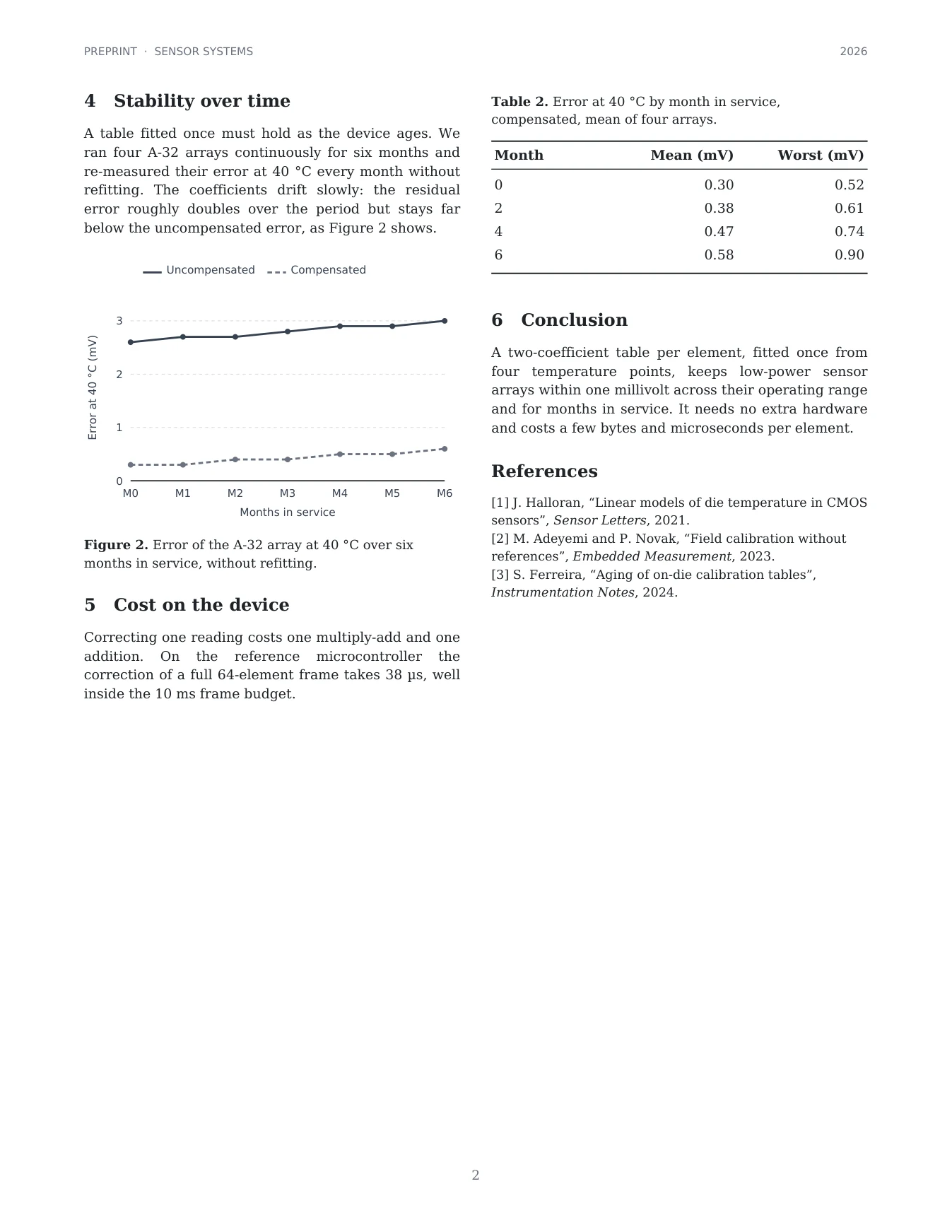
Flat text extraction returns words. The answers your systems need live in charts, table spans, reading order and position, and that is what the parser returns.
Every element comes back with its page, box, reading position and confidence, so any answer can point to the exact region behind it. No method on ParseBench grounds better.
No number is printed on these bars. The parser measures them and returns the table behind the picture, so retrieval finds a value that exists only as a drawing.
| Die temperature | Raw | Compensated |
|---|---|---|
| 0 °C | 2.1 | 0.3 |
| 20 °C | 0.4 | 0.1 |
| 40 °C | 2.6 | 0.3 |
| 60 °C | 4.9 | 0.5 |
Eight values, eight exact. Legend: Drift (mV).
A financial statement keeps its period headers, its negatives in parentheses and its bold totals, so the numbers land in the right column of your pipeline.
rowspan and colspan.| Q3 | Nine months | |||
|---|---|---|---|---|
| € thousands | 2025 | 2024 | 2025 | 2024 |
| Revenue | ||||
| Industrial robots | 48,210 | 41,560 | 139,880 | 118,420 |
| Service and spare parts | 12,930 | 11,210 | 37,660 | 32,150 |
| Software subscriptions | 5,420 | 3,980 | 15,110 | 10,870 |
| Total revenue | 66,560 | 56,750 | 192,650 | 161,440 |
| Cost of sales | (38,140) | (33,590) | (111,230) | (96,020) |
A page shot on a desk, at an angle, under uneven light, comes back with its headings, its numbered list and its table, as if it had been born digital.
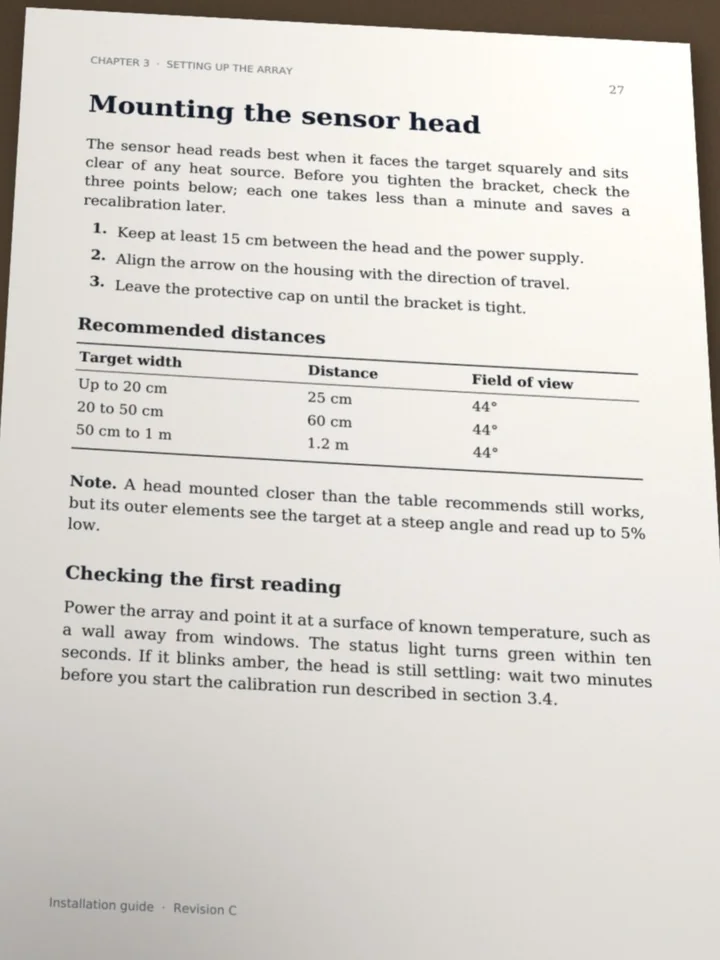
Mounting the sensor head
Recommended distances
| Target width | Distance | Field |
|---|---|---|
| Up to 20 cm | 25 cm | 44° |
| 20 to 50 cm | 60 cm | 44° |
| 50 cm to 1 m | 1.2 m | 44° |
Most RAG errors start before retrieval: flattened to text, a page loses its tables, charts and column order. The parser is the document-understanding layer LLMs lack.
1 Introduction Table 1. Mean absolute error over the full thermal cycle, before and after compensation. Arrays built for battery-powered deployments trade thermal isolation for power. Their elements then read Error (mV) Arraydifferently at every temperature, and a field device Before After rarely has the budget for a reference sensor. We show that a small table held on the device is enough to A-16 4.8 0.6 correct them, and that the table can be fitted once, at A-32 5.1 0.7 production time. A-64 6.3 0.9

Drift 2 […] 1 […] 0 0 °C 20 °C 40 °C 60 °C Die temperature
Table cells land inside sentences. The chart gives axis ticks and no values.
## 1 Introduction
Arrays built for battery-powered deployments trade thermal
isolation for power. […] fitted once, at production time.

**Table 1.** Mean absolute error over the full thermal cycle, […]
<th colspan="2">Error (mV)</th> […]
<tr><td>A-32</td><td>5.1</td><td>0.7</td></tr>

#### Legend: Drift (mV)
<tr><td>60 °C</td><td>4.9</td><td>0.5</td></tr>
Sections intact, the table whole, the chart as values, each with its page and box.
Chunk
Split on headings, keep a table or a chart whole: no chunk starts mid-table or mid-sentence.
Retrieve
Table cells and chart values become text the index can match, so a question about a figure finds the figure.
Cite
Every chunk keeps its page, element and box, so an answer can highlight exactly where it came from.
Focus
Running heads, page numbers and footers are tagged, so they stay out of chunks and out of the context window.
Build it with Document RAG, or start from the parsed-document RAG demo.
LM-Kit One serves the parser over REST to any language, on the command line and to agents over MCP. LM-Kit.NET embeds it in your .NET application.
LM-Kit One
The server, for any language and agent
LM-Kit.NET
The SDK, inside your .NET application
import base64, requests

pdf = base64.b64encode(open("annual-report.pdf", "rb").read()).decode()

r = requests.post(
    "http://localhost:5189/lmkit/v1/document-parsing",
    headers={"Authorization": "Bearer YOUR_API_KEY"},
    json={"input": pdf, "effort": "Medium", "output_format": "Markdown"},
)
print(r.json()["content"])
# Every PDF and image in ./contracts, as Markdown in ./parsed
lmkit run document-parsing --in ./contracts --out ./parsed --effort High --output-format Markdown
{
  "mcpServers": {
    "lmkit": {
      "url": "http://localhost:5189/mcp",
      "headers": { "Authorization": "Bearer YOUR_API_KEY" }
    }
  }
}
using LMKit.Document.Parsing;

using var parser = new DocumentParser(ParsingEffort.Medium)
{
    IncludeFigureImages = true
};

ParsedDocument document = parser.Parse("annual-report.pdf");

File.WriteAllText("report.md",   document.ToMarkdown());
File.WriteAllText("report.json", document.ToJson());
document.SaveHtml("report.html");
document.SaveDocLangArchive("report.dclx");
using LMKit.Document.Parsing;

using var parser = new DocumentParser(ParsingEffort.High);
ParsedDocument document = parser.Parse("filing.pdf");

foreach (ParsedPage page in document.Pages)
foreach (ChartContent chart in page.Elements.Select(e => e.Content).OfType<ChartContent>())
{
    Console.WriteLine($"Page {page.PageNumber}: {chart.Caption}");
    Console.WriteLine(chart.Text);   // the plotted series as a table
}
using LMKit.Document.Parsing;

using var parser = new DocumentParser(ParsingEffort.High)
{
    // LaTeX superscripts and subscripts, plain table cells.
    MarkdownConventions = MarkdownConventions.LatexMath
};
ParsedDocument document = parser.Parse("paper.pdf");

// Re-render the same parse for another consumer, no second read.
// No running heads, *emphasis* rather than _emphasis_, page markers.
var conventions = MarkdownConventions.Standard;
conventions.RunningText = RunningTextPlacement.Omitted;
conventions.UnderscoreEmphasis = false;
conventions.PageSeparator = "<!-- page break -->";
File.WriteAllText("paper.md", document.ToMarkdown(conventions));
using LMKit.Document.Parsing;

// On a connected machine: fetch the parser's model once.
DocumentParser.GetModelCards(ParsingEffort.High).Single().Download();

// On the air-gapped machine: point the parser at the file.
using var parser = new DocumentParser(ParsingEffort.High, @"models\lmkit-doc-parser-1.lmk");
Three levels, one model file, one API. Choose per workload: throughput for ingestion, fidelity for filings, the balance for everything in between.
Low
High-volume ingestion and search indexes, where throughput leads. 95% of High's score at 2.1x its throughput.
MediumDefault
Most business documents. 96% of High's score at 1.5x its throughput.
High
Reports, filings and papers, where every table, chart and heading counts.
Measured over the full ParseBench dataset on one RTX 5090, four documents at a time. The LM-Kit One container reaches these scores with its default configuration.
Parse where documents arrive, on any machine, or on your private servers. Fully air-gapped: no call home, no per-page API charge, and no page ever leaves your network.
Edge
Embed the parser in your .NET application on laptops, workstations, scanning stations and factory PCs, where documents are captured.
Edge deploymentLocal
LM-Kit One serves it on your infrastructure as a REST endpoint, a command and an MCP tool, from one installer or container.
Deploy LM-Kit OneAir-gapped
Ship the single model file with your application. Nothing to open in the firewall, nothing to download at run time.
Offline setupWhat a machine needs to run the parser:
Privacy
Contracts, medical records and financial filings are parsed by software you run, with no processor to disclose. Privacy and compliance
Sovereignty
Documents stay on machines you administer. LM-Kit never receives them. Sovereignty
Security
The parser runs under your access controls and your audit, with no external document-processing endpoint and no third-party data path. Trust Center
Local says where the model runs; private says where the data goes. Private AI or local AI sets out the difference.
A text layer is a claim, not a fact. Before trusting a word, the engine checks it against the page as it renders, then reads what the layer gets wrong.
Built by a team with 25+ years in PDF, imaging and document analysis.
Models read. The engine decides what to read, with which reader, and which reading stands, from evidence the page itself prints. That is where the score comes from.
Models change. Your code does not.
Document AI research moves every month. LM-Kit keeps integrating the strongest new readers, layout models and techniques into the engine, and a component ships only when it beats the one it replaces.
Every token goes through Dynamic Sampling.
At inference time, LM-Kit's adaptive layer tracks the structure being written, from the taxonomy of elements to a table's grid and a chart's series, and steers every token to fit it, with grammar where the form must be exact. That is how small models out-read frontier ones.
No Python service, no separate OCR engine, no GPU sidecar. The parser shares one runtime, one scheduler and one release with everything else LM-Kit does.
The parsing pipeline you assemble
LM-Kit
Why integration beats assembly: the private AI stack is the product.
Working console demos on GitHub, step-by-step how-to guides on the docs site, and the API reference for the classes used on this page.
Parse PDFs and scans into typed elements and export Markdown, JSON, HTML and DocLang.
Open on GitHub → DemoEvery chart of a folder of documents, read as data and written as CSV.
Open on GitHub → DemoQuestions over parsed documents, answered with page citations.
Open on GitHub → How-to guideEffort levels, elements, exports, figure pictures, bring-your-own models.
Read the guide → How-to guideCharts as data tables, panels and legends, exported as CSV.
Read the guide → ArticleThe launch article: why LLMs struggle with documents, the results, and how the engine works.
Read the article → API referenceAPI reference for the AI document parser.
Open the reference →Document parsing